All blog
Amazon Compliance
6 Min read

#Content
#Product Listing
#Content Change
Amazon Image Requirements: The Hidden Listing Errors That Cause Suppression and Lost Visibility
Amazon image requirements - trigger search suppression and lost sales when live listings drift from approved assets.
Table of Contents
TL;DR
Amazon image requirements are not just design specs; they affect whether a listing stays visible, clickable, and buyable.
Main image violations, such as non-white backgrounds, text overlays, poor framing, or low resolution, can lead to rejection, image removal, or search suppression.
An image can be compliant when uploaded, but still change later because of catalog drift, reseller contributions, variation conflicts, or Amazon-side overrides.
Sellers should check the live PDP and search thumbnail, not only Seller Central.
WTS utilizes active change monitoring to help compare approved source-of-truth image assets against the live Amazon listing so teams can catch image swaps, missing images, and shopper-facing mismatches earlier.
Amazon Image Requirements: The Listing Errors That Trigger Suppression and Kill Discoverability
Most sellers think Amazon image requirements are a design checklist.
They are not. They are enforcement rules that can directly affect whether your product remains visible, clickable, and buyable on Amazon.
Sarah is an 8-figure seller managing a highly competitive dietary supplement catalog. Her creative team produced pixel-perfect, fully compliant hero images for her top-selling whey protein. But an unauthorized catalog contribution from a gray-market reseller replaced her main image with an unapproved, low-resolution shot featuring a heavy drop shadow.
The ASIN was silently search-suppressed for violating the pure-white background rule, costing her thousands in lost weekend velocity before she even realized the amazon image changed.
A listing can look “fine” in your internal asset folders—and even in the Seller Central backend—and still bleed traffic because the live main image is noncompliant, missing, replaced, or simply no longer what shoppers actually see.
In this guide, you will learn exactly what Amazon image requirements are, why compliant images still fail on the live listing, and how to protect image accuracy at scale.
The True Cost of Image Violations
Before diving into the technical specifications, here is exactly how algorithmic enforcement and image drift impact your bottom line.
Issue | What Amazon/Customers See | Likely Business Impact | Presence Risk |
|---|---|---|---|
Non-white main image background | Off-white, gray, shadow-heavy, or contextual background | Lost visibility | |
Text/logo/badge on main image | Promotional text, watermarks, or "Bestseller" badges | Immediate suppression risk | Traffic loss |
Resolution too low / no zoom | Blurry image, broken hover-to-zoom functionality | Lower shopper trust | Conversion drop |
Improper framing/cropping | Tiny product floating in excessive whitespace | Weak search thumbnail | CTR decline |
Missing main or gallery images | Blank slots, broken image icons, or incomplete storytelling | Listing quality damage | Lower conversion / Buy Box risk |
Unauthorized image change | Wrong variant, old packaging, or competitor imagery | Catalog drift | Visibility and trust issues |

What are Amazon image requirements?
Amazon image requirements are strict rules governing how Amazon product images must appear on live listings. Violations like non-white backgrounds, text overlays, low resolution, or missing assets trigger search suppression, reduce discoverability, lower click-through rates, and destroy shopper trust.
Compliance tells you what can be uploaded. Presence tells you what shoppers actually see.
This distinction is critical because most image issues do not start as creative mistakes. They become expensive when the live listing no longer matches the approved asset.
Because of the high risk of backend-to-frontend mismatches, passive image uploads are no longer enough. Protecting your visibility requires active Amazon change monitoring to ensure your approved assets stay locked on the live detail page.
Once you treat images as a Presence issue, the technical requirements become more than upload rules. They become the first layer of suppression prevention.
1. Why Amazon Image Requirements Are a Presence Problem, Not Just a Creative Problem
Amazon image requirements are not just creative specs. They directly affect whether your product stays searchable, clickable, and buyable.
A noncompliant or poorly controlled image can damage your listing in several ways:
Search suppression: Amazon may hide the ASIN from search if the main image violates rules like the pure-white background requirement.
Listing suppression: The PDP may be taken down until the image defect is fixed.
Lower CTR: A weak, unclear, or poorly cropped thumbnail gets ignored in search results.
Lower conversion: Missing gallery images, poor lighting, or broken zoom functionality reduce shopper confidence.
Ranking decay: When CTR and conversion drop, Amazon’s algorithm may treat the product as less relevant.
Buy Box weakness: Severe listing quality issues can hurt overall purchase experience and Buy Box performance.
Shopper distrust: Inconsistent or low-quality imagery makes the product feel unreliable.
The real danger is that sellers often assume uploaded = live. But the image in Seller Central is not always the image shoppers see. Amazon catalog conflicts, reseller contributions, gray-market edits, and backend overrides can silently change the live listing.
For a broader understanding of what triggers listing takedowns, review our guide on Amazon content rules.
2. What are the Amazon Image Requirements That Get Listings Into Trouble?
To protect your product's Presence, you must strictly adhere to Amazon main image requirements. While secondary images have more flexibility, your hero image must follow strict Amazon image specifications or risk instant suppression.
Why a pure white background for the Amazon Image?
Amazon wants a uniform, clean shopping experience. The algorithm scans images for RGB values of 255, 255, 255.
Common violation: Off-white backgrounds, gray gradients, heavy drop shadows, or contextual lifestyle backgrounds. This was the exact violation the gray-market reseller triggered on Sarah’s listing, causing her search suppression.
Why Amazon Product Must Fill at Least 85% of the Frame?
If your product only takes up 50% of the image canvas, the resulting search thumbnail will look microscopic on a mobile phone. Weak framing hurts both compliance and CTR.
Common issue: A tiny product floating in an ocean of excessive whitespace.
Why must the main image show only the Product?
The hero image is for the product being sold—nothing else.
No props: Do not include items that aren't included in the box.
No packaging: Unless the packaging is an essential, approved part of the product (like a branded box set), do not show it.
No lifestyle elements: Save human models and contextual backgrounds for your gallery images.
No extra accessories: Only show what the buyer is actually receiving.
Why No Text, Logos, Watermarks, or Badges on the Main Image?
Adding promotional text, watermarks, or fake "Bestseller" badges to your main image is one of the most common suppression triggers on the platform. Amazon’s image review systems may flag main images that include promotional text, badges, watermarks, or other noncompliant elements. If the main image fails requirements and no compliant main image is available, the listing can lose search visibility until the issue is corrected.
This distinguishes hard compliance rules from soft performance best practices. Keep your main image completely clean.
Protect Your Main Image Before Amazon Makes You Invisible. A non-compliant hero image can trigger search suppression without warning. ave7LIFT® monitors, identifies the root cause, and gives you the fix before revenue disappears.

3. Amazon Image Requirements: Size, Resolution, File Type, and Practical Specs
Understanding amazon product image size goes beyond just preventing errors; it dictates the functionality of your listing. Optimizing the image size for amazon listing formats ensures the hover-to-zoom feature works, which is highly correlated with conversion.
Minimum Resolution and Zoom Threshold
Hard minimum: 500 pixels on the longest side.
Functional minimum: 1000 pixels or larger.
Why 1000px matters: Amazon’s hover-to-zoom feature only activates at 1000px+.
Presence risk: No Zoom means less shopper confidence, weaker product inspection, and lower perceived quality.
Recommended Dimensions for Better Performance
When determining your optimal amazon product photo size and amazon listing image size:
Use 2000 x 2000 pixels as the preferred baseline.
Keep a 1:1 square aspect ratio.
Square images perform well across mobile, desktop, and Amazon’s search grid.
This gives the product more usable visual space without breaking compliance.
Accepted Formats and Upload Readiness
Amazon accepts:
JPEG
PNG
GIF — non-animated only
TIFF
Preferred format: JPEG with a .jpg extension.
Reason: Amazon’s compression system typically handles JPEGs most reliably.
File Size, Compression, and Blurry Images
Keep image files under 10MB.
Avoid over-compressing JPEGs.
Heavy compression can create pixelation, blur, and artifacting.
Blurry zoom images make the product look low-quality, even if the product is premium.
These specs keep the image eligible. But eligible does not always mean effective. Some image problems never trigger a warning—they just quietly reduce sales.
4. The Silent Performance Killers Most “Image Requirement” Articles Miss
Most sellers obsess over compliance—but the real damage happens in the gray zone where images don’t get flagged… they just stop converting.
Your Image Can Be “Approved” and Still Cost You Sales
Amazon compliance is only the floor.
An image can pass Amazon’s bots and still underperform.
Weak images can quietly damage:
CTR
Conversion rate
Shopper trust
Ranking momentum
Revenue
Cropping Problems That Hurt Click-Through Rate
Products cropped too far away look tiny in search results.
Awkward angles make the product hard to recognize.
If shoppers cannot understand the item instantly, they scroll past.
The search thumbnail must make the product clear at a glance.
Low-Quality Images That Reduce Trust
Blurry images create hesitation.
Poor lighting makes premium products look cheap.
Missing Zoom functionality weakens buyer confidence.
In competitive categories, weak visuals can make your offer look lower quality than the product actually is.
Symptoms vs. Root Causes
Symptom | Probable Root Cause | Recommended Fix |
|---|---|---|
High Impressions, Low CTR | Awkward cropping / weak thumbnail | Re-crop to 85% fill; improve lighting |
High Clicks, Low Conversion | Missing Zoom / incomplete gallery | Upload 2000x2000px images; fill all slots |
Sudden Traffic Drop | Main image suppressed by bots | Audit main image for text/non-white background |
Wrong Product Shown | Catalog drift/reseller hijack | Diagnose contribution hierarchy; escalate to Support |

When performance drops or an image disappears, the next step is to separate creative weakness from actual catalog failure.
5. Why Amazon Images Get Rejected, Suppressed, or Fail to Show Correctly?
Most image problems aren’t random—they fall into two categories: hard compliance violations or hidden catalog conflicts that override your control.
Common Amazon Image Issues That Trigger Rejection or Suppression
Non-white background on the main (hero) image.
Text, logos, or watermarks added to the main image.
Low resolution (below 500px on the longest side).
Incorrect framing (product occupies less than 85% of the frame).
Unsupported or incorrect file format.
Variation mismatch (image does not match the selected child ASIN, e.g., wrong color/size).
Why Amazon Images Are Not Showing on the Live Listing
Image issues are not always compliance failures—many are catalog architecture conflicts.
If your update isn’t reflecting, assume a system-level override, not a simple upload error.
Backend vs Frontend Mismatch
Seller Central shows the updated image correctly.
Live product page still displays the old or incorrect image.
This indicates a disconnect between your contribution and Amazon’s live catalog.
Caching and Processing Delays
Amazon may take 15–24 hours to reflect image updates.
Temporary mismatch between upload and live display is normal.
Not all delays indicate a deeper issue—timing matters.
Variation and Parent-Child Conflicts
An incorrect child image may surface due to structural variation issues.
Parent-child relationships can override intended image assignments.
Common in large catalogs with complex variations.
Competing Contributions and Catalog Overrides
The Amazon catalog is a shared environment. Other contributors can override your images, such as Amazon Retail (1P), unauthorized resellers, or other sellers on the listing.
This typically happens when bad actors attempt to map a generic product to your ASIN or try to change brand name on Amazon maliciously. You might find yourself caught in a scenario where amazon another seller changed images brand details without authorization. Attribute hierarchy may prioritize external data over your upload.
When image overrides are part of a broader listing edit, this is a content change problem—much like when you discover Amazon changed my item image or notice that Amazon changed my product category without warning.
When image overrides are part of a broader listing edit, this is a content change problem — not just an image problem.
How Long Should Sellers Wait Before Escalating?
Wait 24 hours after upload.
If the image still hasn’t updated:
The issue is not a failed upload.
It is a catalog conflict or suppression-level override.
At this point, you need root cause diagnosis, not repeated uploads.
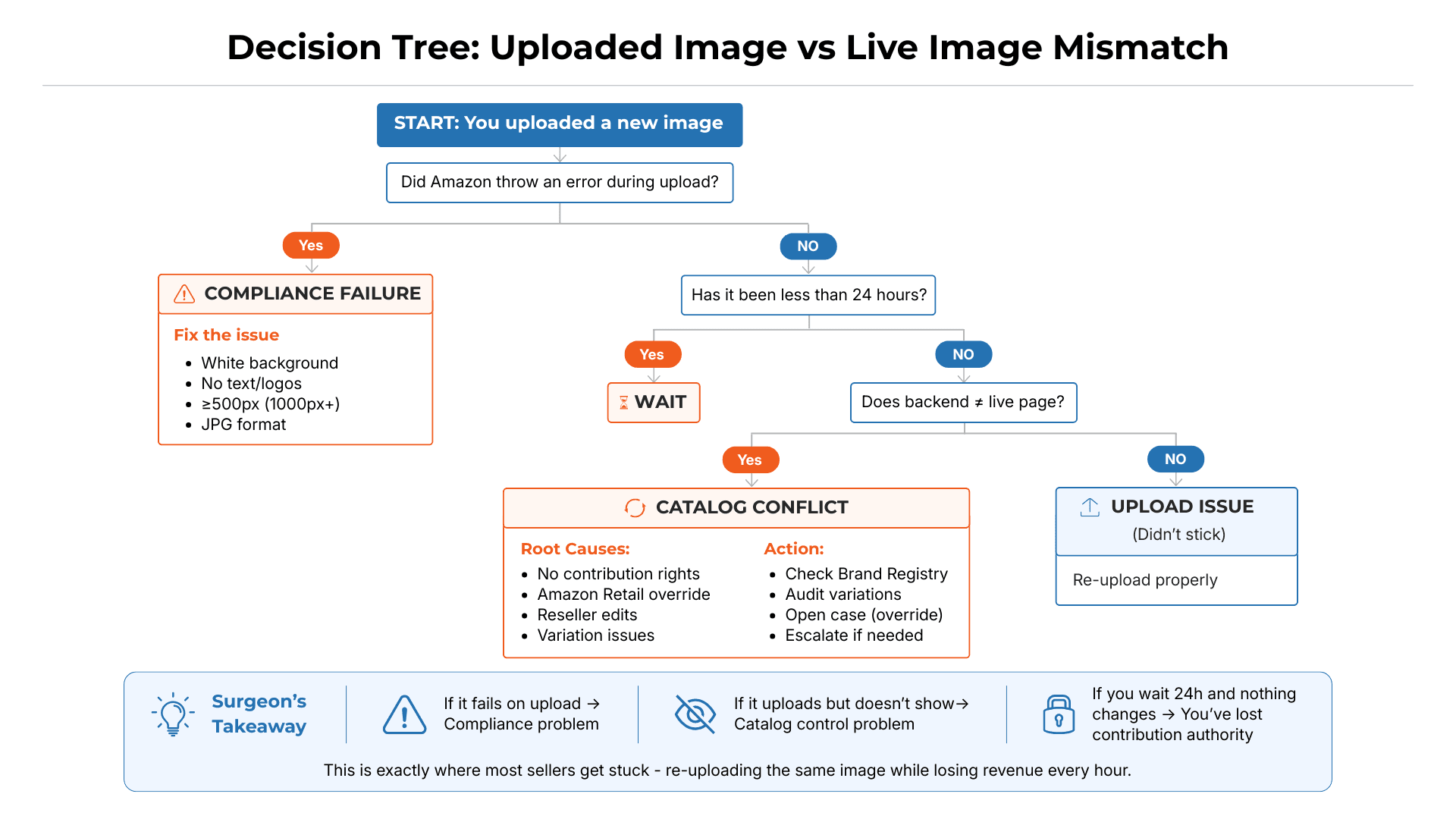
That is why the fix cannot start with another upload. It has to start with root-cause diagnosis.
6. How to Fix and Prevent Amazon Image Issues
Do not keep re-uploading the same image blindly. First, diagnose the issue.
Start by identifying the root cause: compliance rejection, cache delay, variation conflict, locked attribute, reseller override, or catalog override. Each requires a different fix. A non-compliant image needs correction; an overridden catalog contribution needs evidence and escalation.
Next, verify the live shopper-facing listing, not just Seller Central. Check the search thumbnail, PDP gallery, desktop, and mobile view. Seller Central may show a successful upload while shoppers still see the wrong image.
If the file itself is the issue, re-upload through Image Manager using a compliant asset: white background, product filling most of the frame, no text or badges, correct variation image, high resolution, and supported format. If that fails, submit a full update through a flat file to create a stronger catalog contribution.
If the image is still wrong, treat it as a catalog-control issue. Open a Seller Support or Brand Registry case with the ASIN, affected variation, correct image, screenshots of the live error, screenshots of the correct Seller Central upload, and a brief explanation of the mismatch. Frame the case as a shopper-facing catalog accuracy issue, not a complaint.
Once fixed, verify the image in search results, the PDP, and mobile view. Save before-and-after screenshots so your team has a record of what changed and when.
Prevention is the real control point. Keep compliant source files organized, standardize export specs, QA main images before upload, verify live listings after changes, and continuously monitor high-risk ASINs for missing images, swaps, variation mismatches, and CTR drops. The goal is not just to upload compliant assets. The goal is to keep the live Amazon listing compliant after upload.
For one ASIN, this process is manageable. Across hundreds or thousands of ASINs, manual verification breaks down fast.
7. How WTS Helps Monitor Image Drift at Scale
Manual image review does not scale. For teams managing hundreds or thousands of ASINs, checking every main image, every gallery slot, every search thumbnail, and every variation image across the live PDP is not operationally realistic. And alert-only tools make it worse — they tell you something changed, but they do not tell you what the shopper is actually seeing, where the override came from, or what to do next.
This is the specific gap Walk the Store (WTS) is built to close at the image layer.
WTS, inside ave7LIFT®, compares your source-of-truth image assets — the approved main image, gallery images, and variation assignments your team intended to publish — against what shoppers actually see on the live Amazon product detail page. When the live image no longer matches your approved asset, WTS flags the mismatch so your team can act before the issue becomes a suppression event, a CTR collapse, or a catalog audit problem.
At the image level, WTS helps detect:
Image swaps — where your approved main image has been replaced by a reseller contribution, retail override, or catalog merge
Missing images — where image slots that were filled are now empty on the live PDP
Noncompliant main images — where the live image now contains text, a non-white background, or other suppression triggers that were not present in your approved asset
Variation mismatches — where the wrong child image is surfacing due to parentage conflicts
Search thumbnail degradation — where the live search result shows a weaker or incorrect image than your source of truth
Each of these issues connects directly to revenue risk. A swapped image can destroy CTR overnight. A noncompliant image can trigger silent search suppression. A missing image slot can reduce shopper confidence and lower conversion. And none of these will show up in Seller Central as an error — because from the backend view, everything still looks correct.
With ave7LIFT®, the response model is Monitor → Diagnose → Restore. WTS identifies the image drift. AI root cause analysis explains where the override came from — whether it was a retail contribution, a reseller flat file, a variation conflict, or a compliance bot sweep. And if the issue is too complex to resolve through normal upload channels, Fix It For Me connects your team directly to the team’s human experts who can correct the contribution at the catalog level.
Run a Walk-the-Store Audit with ave7LIFT® → See What Shoppers Actually See on Your Listing

Frequently Asked Questions
More Insights from us