All blog
Amazon Compliance
6 Min read

#ASIN Issues
#Content Change
#Content
#Visibility
Amazon Content Rules That Quietly Trigger Listing Edits, Reversions, and Visibility Problems
Amazon content rules explain why listings change even after compliance, covering page drift and how to prevent hidden revenue loss
Table of Contents
TL;DR
While Amazon content rules help sellers create Amazon listing pages that are compliant, following those rules once does not guarantee the live listing will stay accurate. In this blog, you’ll learn:
What Amazon content rules cover,
Why do listings still change post-publishing,
How content drift turns into lost visibility and revenue,
What “live page drift” means,
Why manual change monitoring fails at scale, and
How to stay compliant with the Monitor → Diagnose → Restore approach.
Now let’s break down why even perfectly compliant listings can still fail—and what’s really happening behind the scenes.
Why Following Amazon Content Rules Isn’t Enough to Protect Your Listings?
Amazon content rules define what you can publish—but they don’t guarantee your listing stays compliant. Listings frequently change due to catalog merges, bot overrides, or third-party edits. To stay compliant, sellers must continuously monitor live pages, not just follow rules at upload.
Consider Sarah, the founder of a $2M/year apparel brand. Her team spent weeks cleaning up titles, images, size variations, bullets, and category attributes across a large Amazon catalog. Every top-selling ASIN looked compliant in Seller Central.
Then, over a single weekend, sales of her best seller dropped by 60%.
When she finally checked the customer-facing page, she froze. Her carefully crafted title had been aggressively truncated, stripping out her primary keywords. Worse, her main image had vanished, suppressed by a bot glitch. Her immediate question was: “We followed every rule… so why did our listing change?”
Sarah’s experience isn’t an edge case—it’s how Amazon’s system behaves at scale.
Want to know if your top-selling ASINs have silently drifted? Run a Walk the Store review with ave7LIFT® and compare your source-of-truth catalog data against the live Amazon page shoppers actually see.
But spotting the problem is only step one. To actually protect your revenue, you need to understand how Amazon enforces these rules in real time.
Amazon Content Rules vs. Reality
Here’s where the gap becomes obvious—what Amazon says vs. what actually happens on live listings:
Area | What Amazon Requires | What Actually Happens |
|---|---|---|
Titles | Character limits, no promo language | Overwritten by contributions |
Images | White background, no overlays | Removed by compliance bots |
Descriptions | No claims, limited HTML | Stripped or simplified |
Variations | Accurate structure | Broken or merged incorrectly |
Category | Correct browse node | Auto-reclassified |
Bullet points | Benefit-led bullets, no fluff | AI cleanup or removal of weak/non-compliant bullets |
A+ / enhanced content | Brand storytelling | claims or modules can still be rejected, limited, or changed |
This mismatch exists because most sellers misunderstand one core thing: how Amazon actually operates. Let’s start with the foundation.
1. What Are Amazon Content Rules?
When you read Amazon’s policies on titles, images, descriptions, variations, and attributes, it’s easy to treat them like a style guide. But they are not static suggestions. Every category has its own overlapping compliance layers.
Enforced by bots, not humans: A bot doesn't care about the context of your electrolyte powder; it only scans for triggers.
Continuously re-evaluated: A listing that passes compliance on Tuesday can be flagged on Thursday if an algorithmic update alters the parameters.
Amazon treats listings like shared assets—not owned assets. You submit data, but Amazon ultimately decides what to display based on its own internal logic.
Amazon content rules apply across listing titles, bullets, descriptions, images, variations, attributes, and specific category listing requirements.
What Is Allowed vs. Prohibited Content?
Bots are programmed to execute immediate takedowns for specific infractions. The most common triggers include:
Prohibited claims: Medical, pesticide, or misleading statements (e.g., "cures," "anti-microbial").
Promotional language restrictions: "Best-selling," "Number 1," or "Free shipping."
External links and branding violations: Directing traffic away from Amazon or misusing registered trademarks.
For a deeper breakdown of restricted claims and enforcement triggers, see our Amazon Compliance guide.
This is why one-time compliance is not enough. A listing can be correct at upload and still become unstable later.
And when these rules are enforced dynamically, small content changes can trigger much bigger business consequences.
2. How Does Listing Drift Turn Into Lost Revenue?
Once a listing starts drifting, the damage rarely stays inside the content field that changed. It spreads into the signals that control whether the product is visible, clickable, and buyable.
This is not just a content issue. It is a Presence failure. If the product is not visible and buyable as intended, the business is already losing money.
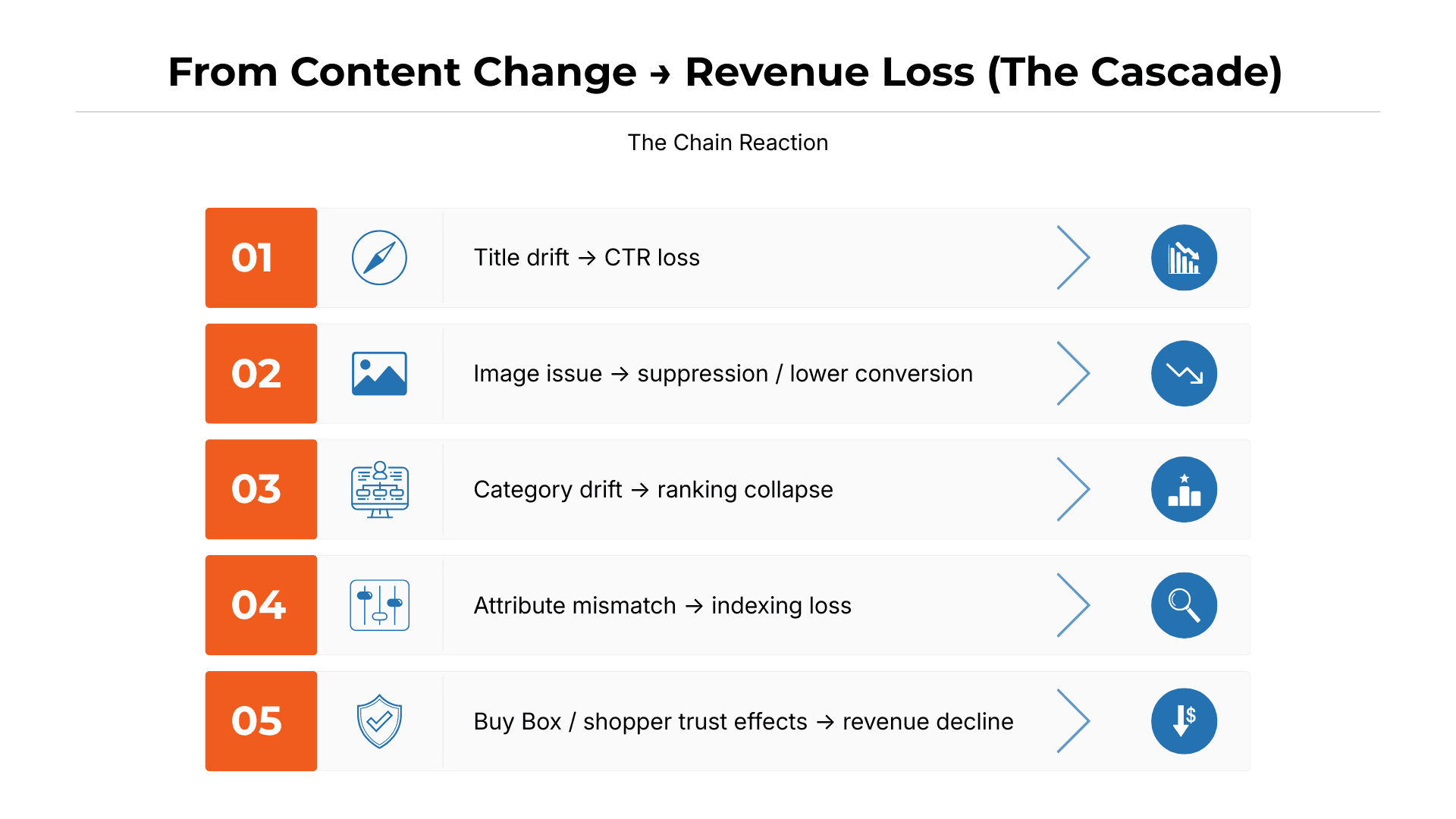
This raises a critical question: if everything was compliant, why did it still break?
3. Why Does Following Amazon’s Rules Once Still Lead to Broken Listings?
The core mistake most sellers make is treating compliance as a one-time upload task instead of an ongoing control problem. You need to shift from symptoms to systems.
Diagnosis → Root Cause → Solution
Diagnosis: Your listing was fully compliant when it was uploaded.
Root Cause: Amazon can still alter that listing through catalog merges, retail overrides, and third-party contributions.
Solution: Continuously compare the live page against your source of truth.
But here’s the gap most teams miss: there is no built-in way inside Amazon to reliably compare what you submitted with what customers actually see.
This shifts your workflow from guesswork to control. Because on Amazon, compliance is not a state you achieve once—it’s something you have to actively maintain.
And without visibility into the live page, even compliant content can quietly become broken content.

This ongoing instability has a name—and understanding it is key.
4. What Is “Live Page Drift” And Why It’s Killing Revenue?
Live Page Drift is when your intended listing content no longer matches what customers see on Amazon. It occurs when Amazon's dynamic catalog overrides your backend submissions with data it deems more relevant or compliant.
Common Symptoms
Sellers experiencing Live Page Drift usually notice a few distinct red flags:
Title not updating despite multiple backend submissions.
Backend data ≠ live page data.
Content reverting to older, less optimized versions.
Listings “look fine” internally but suffer from suppressed buy boxes or plummeting conversion rates.
Seller Central is not your storefront. The customer-facing page is. If you are only monitoring your backend, you are completely blind to what your buyers are actually experiencing.
This is also why Amazon change monitoring matters: the live page can drift long before the backend view makes the damage obvious.
Most sellers don’t notice it immediately, but the signs are always there:
5. Why Can Amazon Change Your Listing Without You Doing Anything?
Even when sellers follow Amazon’s content rules correctly, listings can still change after publication. That is because Amazon does not treat a product detail page as a fixed, seller-controlled asset. It treats it as a shared catalog page that can be re-evaluated at any time based on contribution authority, compliance signals, and catalog structure.
That means a listing that looked correct when it was uploaded can later change on the live page without warning.
Where changes usually show up
Titles
Titles are one of the most vulnerable fields because they affect both search relevance and compliance. You might experience an unexpected amazon title change made by a higher-authority contributor, or find your amazon list not updating even after you submit a correction. A highly frustrating scenario is having an amazon title not updating in Seller Central, resulting in the amazon product title not changing on the live customer-facing page.
Images
A main image can be suppressed even when the listing remains active. Small formatting issues, overlays, or bot-detected policy concerns can remove the image from the live page and hurt both visibility and conversion.
Descriptions and A+ Content
Descriptions and A+ modules help explain the product, but they are still subject to claims enforcement and formatting limits. Amazon may strip unsupported HTML, remove flagged language, or simplify content that no longer meets its standards.
Category and attributes
If Amazon changes a browse node or key product attribute, the listing may suddenly be judged against a different rule set. That can affect indexing, suppression risk, and overall discoverability.
Variations and brand data
Variation structure, brand ownership, and contribution conflicts can also destabilize the page. A broken parent-child relationship (which you might attempt to fix using the variation wizard) or conflicting data when you try to change brand name on Amazon can weaken the listing or make updates harder to push through.
These changes don’t happen randomly—they tend to appear in predictable areas.
At a deeper level, these changes are driven by a few core mechanisms:
For a full breakdown of why listings change without seller input — including how catalog merges, retail overrides, and compliance bots interact — see our guide on Amazon Change Monitoring.
6. What usually causes Amazon to change a listing?
Even when your content is compliant, Amazon can still change the live listing because multiple systems and contributors influence the same detail page. The most common causes are:
Catalog merges: Amazon combines your ASIN with duplicate or related listings and inherits weaker content
Retail overrides: Vendor Central or higher-authority contributions replace Seller Central inputs
Compliance bots: Automated checks remove claims, images, or formatting that they flag as violations
Hijacker or reseller edits: Unauthorized contributors submit lower-quality catalog data
Automated Updates: An internal Amazon auto content update might overwrite your manual input. Similarly, a third party might submit an Amazon product content update, or a backend glitch could trigger an Amazon product content update change asin protocol that leaks in marketplace data from another region.
Multiple uncontrolled inputs can create an unstable live page.
The important takeaway is this: a compliant upload does not guarantee a stable listing. Sellers need to verify rules at the category-template level, publish carefully, and then monitor the live page to catch changes before they turn into visibility, conversion, or revenue loss.

Knowing the causes is useful—but managing them is where most teams struggle.
7. Why Manual Content Control Fails at Scale
For sellers managing a handful of ASINs, a manual walkthrough of the live product detail page is a reasonable habit. It catches obvious issues — a missing image, a truncated title, a broken variation — before they compound.
But as the catalog grows, this approach breaks down fast.
When you have hundreds or thousands of SKUs, physically reviewing each live page at regular intervals becomes impossible. Titles, images, bullets, categories, and attributes can change quietly after publication, and large catalogs make those changes easy to miss between review cycles. By the time someone catches the issue, the listing may already be losing search visibility, conversion rate, or Buy Box health — and the damage has often been running for days or weeks without a single Seller Central alert.
Alert-only tools do not solve this either. They may notify you that something changed, but they stop there. They do not show you the live-page mismatch clearly. They do not explain whether the change came from a retail override, a catalog merge, a compliance bot sweep, or a hijacker edit. And they do not give you a reliable restore path. An alert without a root cause is just anxiety with a timestamp.
This is the exact gap ave7LIFT® Walk the Store (WTS) is built to close.
WTS is not a manual checklist. It is the live catalog audit capability inside ave7LIFT®. It automatically compares your source-of-truth product data — the titles, images, bullets, attributes, category assignments, and variation structure your team intended to publish — against what shoppers actually see on the live Amazon product detail page. When the two versions do not match, WTS flags the mismatch, identifies where the drift occurred, and surfaces the issue before it turns into a visibility, conversion, or revenue problem.
For large catalogs, this is the difference between catching a content change in hours and discovering it weeks later through a sales drop you cannot explain.
ave7LIFT® monitors 230+ Presence signals across listing health, catalog accuracy, Account Health, compliance status, Buy Box health, suppression signals, and inventory risk. That scale is not achievable through manual spot checks or alert-only tools. It requires a system that continuously walks the store on your behalf — comparing what your team published against what Amazon is actually showing your customers — and tells you not just what changed, but why it changed and what to do next.
That is the Monitor → Diagnose → Restore model in practice. And it starts with knowing the live page, not just the backend record.
Once you understand the model, the next step is prevention.
8. How to Prevent Listing Drift Before It Costs Sales
Smart sellers treat Amazon content compliance as an ongoing process, not a one-time upload.
First, define a source-of-truth listing for each key ASIN: title, images, bullets, category, attributes, variations, and compliance language.
Then, audit the live Amazon page regularly to confirm shoppers are seeing the approved version.
Monitor the attributes that directly affect Presence:
Title — the first field to be overwritten by higher-authority contributors; a changed title kills CTR and keyword indexing simultaneously
Main image — compliance bots can suppress the image from the live page even when the listing remains active, immediately destroying conversion
Category — a reclassified browse node changes the compliance ruleset the listing is judged against, which can trigger suppression or ranking collapse with no warning
Variations
Brand name
Buy Box status
Suppression status
Compliance claims
If drift appears, act fast. A changed image, broken variation, or wrong category can quickly lead to lost visibility, lower conversion, or suppression.
For large catalogs, manual checks do not scale. Use automated monitoring to detect drift, prioritize the issue, and restore the listing before revenue is affected.

Case StudyA legacy ASIN worth $1M annually was blocked by a hidden attribute error. For 13 months, the team relied on manual checks and generic Seller Support guidance, but neither revealed the real issue. They had visibility into the symptom, not the cause. Once ave7LIFT® identified the root cause—a buried category mismatch from an old retail contribution—the team knew exactly what authoritative data to submit. The ASIN was reinstated in 2 weeks, recovering $750K in revenue. Takeaway: Visibility matters, but diagnosis is what gets listings restored. |
The case study makes the core lesson clear: the real challenge is not just spotting listing issues, but restoring the right version before revenue loss compounds.
For teams managing large catalogs or complex drift scenarios, ave7LIFT®'s Fix It For Me option connects you directly to Human experts who can identify the contribution source, submit authoritative data on your behalf, and restore the correct listing version — without you having to navigate Seller Central cases alone.
Conclusion
Sellers who lose listings to content drift are rarely the ones who ignored Amazon’s rules. More often, they followed the rules once, assumed the job was finished, and stopped monitoring.
Amazon doesn’t preserve listings as you publish them. It constantly re-evaluates content within a shared catalog where retail inputs, compliance systems, catalog merges, and third-party edits all influence what shoppers ultimately see. This means your backend may appear correct while the live listing is already compromised. By the time declining revenue makes the issue obvious, the damage has often been building for weeks.
The real risk isn’t non-compliance at the time of upload—it’s losing visibility afterward.
That’s exactly the problem Walk the Store (WTS) within ave7LIFT® is designed to solve. It’s not a one-time audit, but an ongoing system that continuously compares your intended catalog data with the live Amazon listing, detects drift as it happens, and guides your team from identification to root-cause analysis to resolution.
If your catalog has grown beyond what manual checks can realistically manage, that’s the warning sign. The listings you aren’t actively monitoring are usually the first to drift.
Everything discussed here points to one solution: WTS. It acts as a continuous live catalog audit, aligning your approved source-of-truth data with what shoppers actually see on Amazon—so your team can detect, diagnose, and restore listings before content drift turns into lost revenue.
Summary
Amazon content rules define what sellers are allowed to publish — titles must stay concise and free of promotional language, images must meet strict formatting standards, descriptions cannot include unverified claims or contact information, and variations must reflect genuine product differences. These are not suggestions. They are enforced by automated systems that can suppress, reclassify, or remove a listing without notice.
But following those rules at upload is only the starting point.
Even compliant listings can drift after publication. Amazon's catalog is a shared asset, not a seller-controlled page. Automated merges can pull in weaker content from duplicate ASINs. Retail or vendor contributions can override Seller Central submissions. Compliance bots can remove images or strip claims based on updated enforcement logic. Other sellers can submit conflicting data that alters your live page without your knowledge. By the time the drift shows up in your performance metrics, the damage to visibility, conversion, Buy Box health, or ranking has often already been running for days.
This is why one-time compliance is not enough. The correct model is Monitor → Diagnose → Restore: continuously compare the live shopper-facing page against your intended source-of-truth data, identify the root cause behind any mismatch — whether it is a catalog merge, a retail override, a compliance bot sweep, or a contribution conflict — and restore the correct version before the issue compounds into a Presence failure.
Walk the Store (WTS), inside ave7LIFT®, automates this process. It compares your approved catalog data against what Amazon shoppers actually see on the live product detail page, flags drift the moment it appears, and supports faster root-cause diagnosis and restoration — so your team catches content changes before they become suppression events, ranking losses, or revenue problems.
Frequently Asked Questions
More Insights from us