All blog
Product Listings
6 Min read

#Content Change
#ASIN Issues
#Content
#Product Listing
Amazon Change Monitoring: Why Did My Amazon Sales Drop If I Didn’t Change Anything?
Amazon change monitoring helps sellers catch listing drift and hidden suppression before revenue drops. Learn what to monitor and how to respond.
Table of Contents
TL;DR
Amazon listings can change behind the scenes, even when your team has touched nothing, making Amazon change monitoring essential.
The biggest revenue risks usually come from an unexpected Amazon content change, image issues, category listing drift, pricing problems, Buy Box loss, and silent suppression.
A listing can still look active in Seller Central while the live shopper-facing page is already hurting traffic, conversion, and sales.
Manual checks may work for a few ASINs, but they break down fast as catalogs grow; you need automated Amazon product alerts.
Effective Amazon change monitoring needs more than simple listing alerts. It needs a trusted baseline, root-cause diagnosis, and a clear restore path.
Walk the Store (WTS) helps brands perform content change monitoring by comparing source-of-truth catalog data against the live Amazon page.
In this guide, we’ll cover why Amazon listings change without warning, which changes damage revenue fastest, what sellers should monitor, outline a practical workflow to resolve, and how to build a faster response process.
Amazon Change Monitoring: Guide to Protecting Listings from Silent Revenue Loss
If your Amazon sales dropped and you didn’t touch your listing, don’t assume nothing changed. In many cases, your live detail page has already drifted from your source of truth—titles rewritten, images swapped, categories altered, or other listing details changed—without any Amazon listing alerts. This is catalog drift. Amazon didn’t notify you, and most sellers only discover it after revenue is already down.
It happens more often than most sellers realize. On Amazon, listings can change without warning due to issues with Amazon catalog merges, retail overrides, compliance updates, pricing logic, or contributions from other sellers. By the time someone notices, the damage has often already spread into search visibility, conversion rate, Buy Box performance, and ad efficiency.
In this guide, you’ll learn why Amazon listings change, which changes cause the fastest revenue damage, what to monitor, and how to respond before the problem compounds.
Sarah, an apparel brand owner, learned this the hard way. Her best-selling ASIN still looked active in Seller Central, but a case where Amazon changed my product category through drift had already pushed it out of search results.
If your Amazon listing changes silently, the impact often shows up first in visibility, conversion, Buy Box health, or ad performance. The fastest way to limit damage is to detect the change early through a robust Amazon product monitor, identify the root cause, and restore the correct version before the loss spreads.

Amazon Change Monitoring at a Glance
What it is | Tracking unexpected changes to live Amazon listings and offer conditions |
What changes matter most | Title, main image, bullets, category, attributes, price, Buy Box, suppression |
Why sellers miss it | Seller Central may still show listings as active while the live page or discoverability is already broken |
Biggest risk | Silent revenue loss and listings being reverted to generic product |
Best response | Detect fast via Amazon content change alerts, identify the root cause, and restore |
1. What Is Amazon Change Monitoring?
Amazon change monitoring is the process of tracking live listings and offer changes against a known source of truth. The goal is to catch silent changes before they affect discoverability, conversion, Buy Box eligibility, inventory flow, or compliance. Amazon change monitoring exists for one reason: to catch listing issues before they turn into revenue loss.
For most sellers, this means setting up new listing alerts for titles, images, bullets, categories, variation structure, key attributes, price, Featured Offer status, inventory status, and suppression signals. For larger brands, it also means content monitoring to compare the shopper-facing detail page against the catalog data that was intended to be live. This is not just Amazon listing alerts; it is revenue protection.
In other words, Amazon change monitoring is not just about spotting edits. It is about protecting the signals that keep a listing visible, buyable, and winning.
To understand why monitoring matters, you first need to understand how Amazon listings change in the first place.
2. Why Did Amazon Change My Listing Without Telling Me?
The most dangerous assumption an Amazon seller can make is that a listing is a set-it-and-forget-it asset.
It is not.
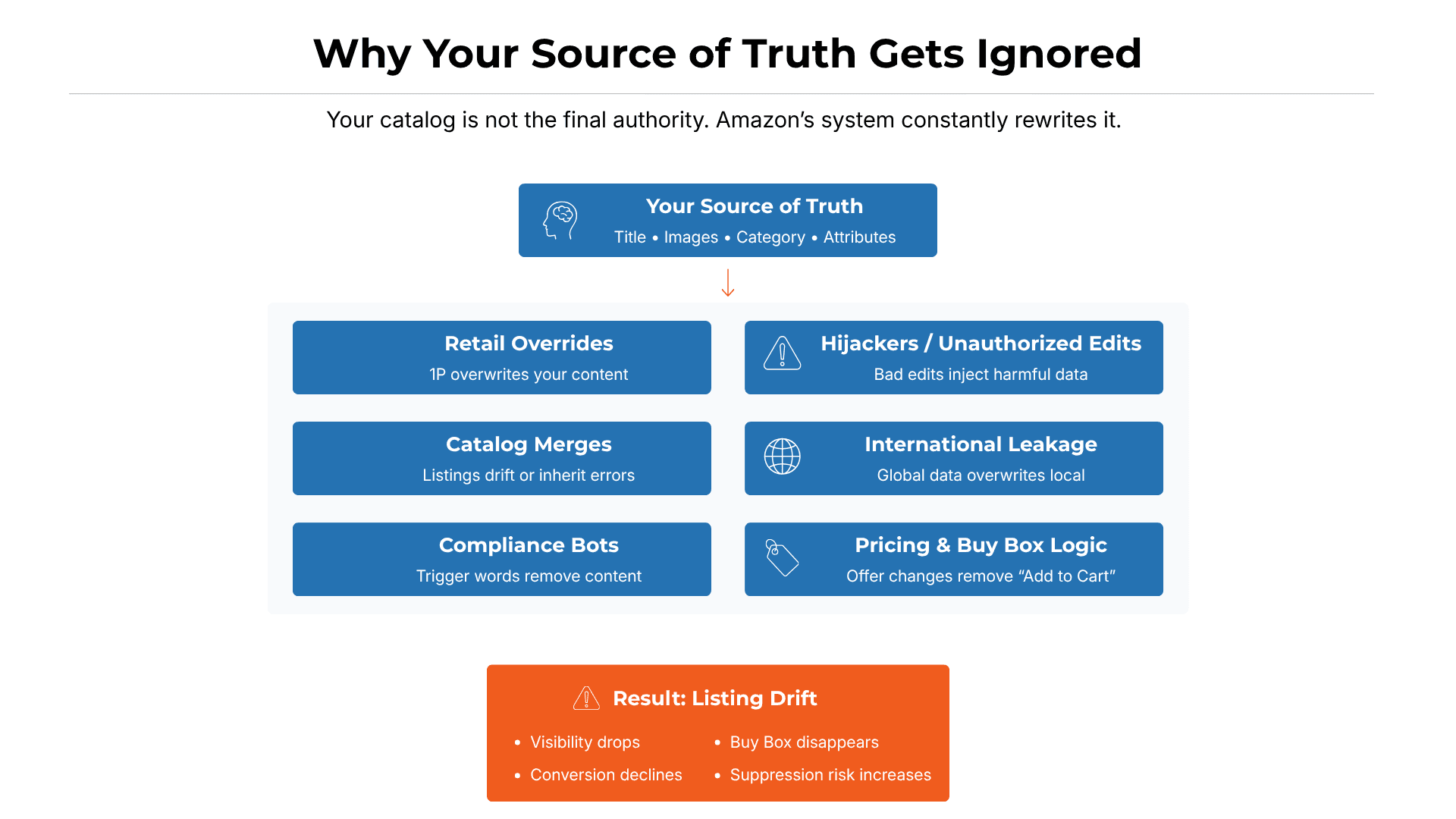
On Amazon, a listing is part of a shared catalog, not a piece of digital property you fully control. Even when your content is correct, optimized, and brand-registered, Amazon can still accept contributions from other sources—sometimes even attempting to change brand name on Amazon listings without your permission.
That happens because the catalog is constantly being updated by multiple inputs that often ignore Amazon content rules, including Amazon Retail, competing vendors, third-party sellers, automated compliance systems, and catalog quality bots. In practice, your internal records can still look “correct” while the shopper-facing page has already changed.
Common causes of unexpected Amazon listing changes
Retail contribution overrides
Issues with Amazon catalog merges
Variation corruption
Compliance bot sweeps
International attribute leakage
Hijacker edits
Pricing or Featured Offer logic changes
For sellers, the real problem is not just that the change happened. It is often the case that the change goes unnoticed because you didn't have a content monitor in place until sales, visibility, or conversion have already been damaged.
The key takeaway is simple: your listing can drift even when everything looks correct internally.
If you're seeing unexplained changes and don’t have a clear way to diagnose them, a structured Amazon content change monitoring service of ave7LIFT® can help identify the source of the issue and restore the correct version faster.
3. What Should You Monitor on Amazon Listings?
Signal to monitor | Why it matters | What happens if it drifts |
Title | Impacts CTR and indexing | Click-through drops, search relevance weakens |
Main image | Drives conversion; must meet Amazon image requirements | Search suppression or CVR drop |
Bullets/description | Supports SEO and conversion | Weaker relevance and more returns |
Category / browse node | Controls discoverability and compliance context | Ranking collapse, wrong search placement |
Key attributes | Affects filtering, indexing, and compliance | Listing becomes incomplete or less discoverable |
Variation structure | Protects parent-child integrity | Review dilution, broken discoverability, and orphaned children; this necessitates a manual fix via the Variation Wizard. |
Price / CPT risk | Impacts Buy Box and featured offer status | Buy Box loss, suppressed offer |
Buy Box status | Directly affects conversion and ads | Add to Cart disappears |
Number of offers | Signals hijackers/resellers | Margin loss and Buy Box pressure |
Inventory / stranded status | Prevents silent sellability issues | Storage cost without revenue |
Suppression/visibility | Confirms listing is actually searchable and buyable | Revenue leak while listing still appears active |
With around 230+ listing parameters, it’s simply not feasible for any human to perform a manual listing review for each one consistently. Critical underlying signals—often invisible at a glance—can change without notice and quietly impact rankings.
Monitoring all of these signals manually is not realistic at scale. This is exactly where tools like ave7LIFT® come in—helping sellers track critical listing and offer changes across large catalogs without relying on manual checks.
For larger catalogs, these signals need to be monitored as a system, not checked one by one.
4. Which Listing Changes Affect Sales the Fastest?
To protect your "Presence," you must monitor specific signals. For Sarah, the category drift was the killer, but it was likely preceded by other "attribute corruptions - when the backend product data of a listing becomes incorrect, causing the listing to lose indexing, visibility, or compliance accuracy" she didn't see.
Here is how listing changes evolve from a "glitch" into a revenue disaster:
Title Changes:
Root Cause: Retail override or brand registry conflict.
Impact: Massive drop in Click-Through Rate (CTR) and keyword indexing loss.
Image Changes:
Root Cause: Compliance bot removal. Impact: CVR crashes if the listing fails Amazon image requirements.
Impact: Conversion rate (CVR) crashes as customers lose trust.
Bullet/Description Edits:
Root Cause: Algorithmic "correction" or variation leakage.
Impact: Loss of long-tail SEO and an increase in "Product Not as Described" returns.
Category Drift:
Root Cause: Improper catalog merge.
Impact: Total loss of BSR (Best Seller Rank) and search invisibility.
Attribute Corruption:
Root Cause: Data leakage from international marketplaces (e.g., Amazon UK data overwriting US data).
Impact: Critical backend keywords are deleted, leading to a "silent" ranking fade.
Pricing Changes:
Root Cause: Lost Buy Box due to "Competitive Price Threshold" bots.
Impact: Immediate halt of all PPC spend and 90% revenue loss.
Buy Box Suppression:
Root Cause: Hidden health violations misdiagnosed as pricing errors.
Impact: The "Add to Cart" button vanishes, forcing customers to click "See All Buying Options."
The real danger is that these changes rarely stay isolated. One listing issue often triggers a wider chain reaction across visibility, ads, and inventory.

5. How Does a Listing Change Turn Into Lost Revenue?
A listing change is rarely an isolated event; it is the first domino in a Cascade Effect.
When the category drifts, here is what happens in the next 72 hours:
Phase 1: The image was removed because the new category (Industrial) had different compliance standards.
Phase 2: Search suppression triggered because the listing now lacked a main image.
Phase 3: All Amazon Advertising (PPC) was automatically paused because the listing was no longer "Featured."
Phase 4: Unsold inventory began to sit in FBA warehouses, requiring Amazon stock alerts.
Phase 5: The IPI (Inventory Performance Index) Score began to drop, threatening storage limits for the next quarter.
This is why listing drift cannot be treated as a cosmetic issue. A single change can trigger a chain reaction across visibility, conversion, ads, and inventory performance.
Once you see how quickly one issue can cascade, it becomes clear why manual spot checks are rarely enough.
6. Why Manual Monitoring Fails?
Manual monitoring breaks down much sooner than most sellers think.
Checking a few ASINs each morning may feel proactive, but it does not scale. Once a catalog grows, the job is no longer just reviewing product pages. Sellers also have to watch titles, images, bullets, categories, attributes, Buy Box status, suppression signals, and compliance issues. At that point, the problem is not effort. It is scale.
Why does manual monitoring stop working
It does not scale: As catalogs grow, it becomes harder to catch silent changes before they affect revenue. Whether you manage 100 SKUs or 50,000, manual review is too slow for a marketplace that changes constantly.
There is no stored baseline: Without a timestamped record of what the listing looked like before the change, it is much harder to prove drift, diagnose the issue, or restore the correct version.
Teams miss what shoppers actually see: A listing can still appear “Active” in Seller Central while already being suppressed, miscategorized, or missing key attributes. If your team only checks the backend view, it can miss live-page problems that are already hurting visibility and conversion.
This is where most basic monitoring approaches fail, too. An alert that says something changed is not enough. Without root-cause clarity, the team still has to investigate the issue manually, decide whether it matters, and figure out what to do next. That delay is where revenue loss compounds.
That is why manual spot checks and alert-only tools break down as catalogs grow. The issue is not just seeing that something changed. It is proving what changed, why it changed, and what to do next.
If manual checks and alert-only tools both fall short, the next question is what effective monitoring should actually look like.
7. What Effective Amazon Change Monitoring Looks Like
The best way to catch and fix a listing change is not to rely on listing alerts alone. Effective Amazon change monitoring should show what changed, why it matters, and what to do next.
It starts with a trusted baseline. Sellers need a clear record of the last approved version of the listing, including the title, images, bullets, category, attributes, pricing, and variation structure. Without that source of truth, it is much harder to prove what changed or restore the correct version.
From there, good monitoring should check both the live Amazon detail page and the backend catalog signals. That matters because a listing can still appear active in Seller Central while the shopper-facing page is already damaged in ways that hurt visibility, conversion, or Buy Box health.
A strong system should also incorporate review alerts. Often, the first sign of a listing error (like an incorrect image or description) is a customer asking how to change review on Amazon because they received a product that didn't match the listing.
That is the real-world problem ave7LIFT® is built to solve.
Instead of forcing sellers to stitch together alerts, screenshots, spreadsheets, and guesswork, ave7LIFT® is designed around an end-to-end workflow: Monitor → Diagnose → Restore.
That means the job is not finished when a change is detected. The system has to help answer three questions fast:
What changed?
Why does it matter?
What should we do next?
When those three answers are missing, teams stay reactive. When they are clear, sellers can contain damage before it spreads into ads, inventory, conversion, and account health.
So the real goal of Amazon change monitoring is not just to catch listing edits. It is to create a faster path from detection to decision to correction.
That raises an even bigger issue for brands with growing catalogs: if the backend view is not enough, how do you consistently verify what is actually live on the shopper-facing page, especially for larger catalogs?

8. What is the most effective way for Amazon Change Monitoring?
This is where Walk the Store (WTS) becomes critical. Once a catalog grows beyond a small set of ASINs, manual spot checks stop working. Teams may believe a listing is fine because the backend looks clean, while the live Amazon page has already drifted in ways that hurt visibility, conversion, Buy Box health, or listing stability.
WTS by ave7LIFT® is built for that gap. It acts as a live catalog audit capability that compares your source-of-truth product data against what shoppers actually see on Amazon. Instead of relying on internal catalog fields alone, WTS helps ecommerce and catalog teams identify mismatches between the intended listing and the live storefront before those issues turn into bigger revenue problems.
This matters because Amazon listing changes often happen without the seller's input. By the time a team notices the issue manually, the damage may already be underway in the form of weaker rankings, lower conversion, suppressed visibility, or Buy Box pressure.
With WTS, teams can:
Compare intended catalog data against the live shopper-facing page
Catch live-page mismatches before customers do
Identify issues such as missing attributes, bullet changes, image mismatches, and category or variation drift
Reduce the risk of suppression, ranking loss, Buy Box instability, and conversion decline
Scale monitoring across large catalogs without relying on manual review
WTS turns Amazon change monitoring into a practical system for catching silent drift, validating the live page, and restoring the intended listing faster.
Everything you just learned is only fully solved by WTS.
9. Which Amazon Listing Issues Need Immediate Action?
Not all listing changes carry the same "lethality." Understanding the "decay rate" of your listing via a consistent Amazon product monitor is vital:
Understanding the "decay rate" of your listing is vital:
Speed | Examples | Typical impact |
Minutes | price change, Buy Box loss, out-of-stock | Ads stop, Add to Cart disappears |
Hours | title overrides, bullet drift, category changes | CTR, ranking, and conversion damage |
Days | image issues, attribute corruption, backend keyword loss | slow ranking fade and silent discoverability loss |
If sales drop while the Buy Box remains active, the issue is often a slower-moving listing problem such as attribute drift, category errors, or content mismatches. That is why sellers need monitoring that checks more than the Buy Box status alone.
Run a Walk the Store review to compare your live listings against your source of truth and uncover hidden drift before it spreads into ranking loss, suppressed visibility, or conversion decline.
Get a 30-day trial with ave7LIFT®.
Conclusion
The best solution for silent listing changes is not more alerts. It is a system that helps sellers detect changes early, understand what changed, and move quickly toward correction. That is where ave7LIFT® stands apart. Walk the Store solves one of the hardest parts of Amazon change monitoring by validating whether the live shopper-facing page still matches your intended catalog.
Sellers also need visibility into the wider signals that affect discoverability, buyability, conversion, inventory, and account health. That is why ave7LIFT®’s broader Monitor → Diagnose → Restore workflow helps brands catch critical changes, identify likely root causes, prioritize what matters most, and respond before a quiet listing issue becomes a larger revenue problem. For sellers who have outgrown manual checks and alert-only tools, the real answer is a structured system for protecting listing accuracy and revenue at scale.
Summary
Amazon change monitoring refers to tracking updates across product listings, infrastructure, and consumer activity.
For sellers, it focuses on monitoring listing changes like titles, images, categories, and flags, detecting hijackers, and tracking performance metrics. Updates vary in speed—from minutes for price/inventory to days for images.
Overall, it ensures visibility, control, and quick response to changes across Amazon ecosystems.
Frequently Asked Questions
More Insights from us