All blog
Account Suspension
6 Min read

Amazon Seller Account Login Issues: Troubleshooting Access & 2FA
Amazon seller account login issues explained, including sign-in errors, verification problems, 2FA challenges, USA access rules, and secure Seller Central entry steps
Table of Contents
TL;DR
If your Amazon seller account login fails, assume it’s an access-control event, not a password problem. Most Seller Central lockouts are triggered by risk signals—new device/IP, rapid retries, wrong-region portals, OTP throttling, verification/billing holds, or compromise indicators. Don’t “panic fix” (device hopping, OTP spamming, repeated resets). Stop retries, capture evidence, classify the failure layer, then make the smallest safe move.
Seller Central Login Failures Are Risk Events, Not Password Errors
Before you attempt to fix an Amazon seller account login issue, it’s critical to understand how Amazon evaluates Amazon seller account login access. Most login failures are not credential errors—they’re risk-scored access decisions.”
Most sellers lose time here, not because they don’t act, but because they act without diagnosing the trigger. Password resets, device hopping, network flipping, and repeated OTP requests can add noise to the session and turn a small login problem into a longer lockout window.
We see this most often when sellers travel or switch networks—Ethan (a $1M+ GMV supplements seller) learned this the hard way when a new network triggered a 2FA loop, and his rapid retries made it worse.
Lockouts like this usually begin as smaller trust signals days earlier—catch them early, and you protect your presence before access breaks.
Do This Now (60-Second Triage)
Key rule: Reactive fixes assume the problem started today. Amazon enforcement assumes the problem started earlier. Once you’ve stabilized, use this classifier to choose the smallest safe next step. |
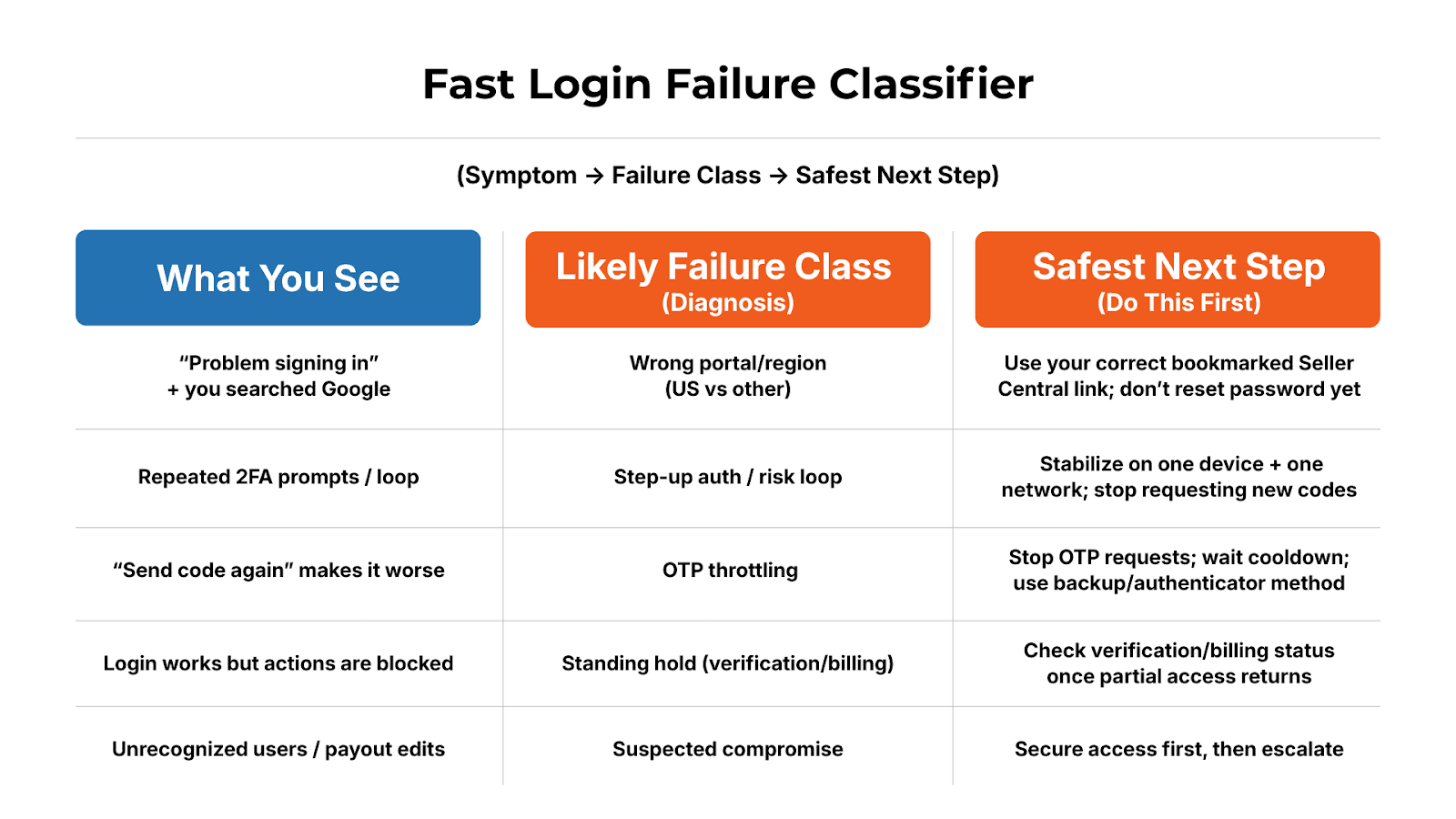
In this blog, you’ll learn to pinpoint what’s blocking access (portal/region, 2FA, session, holds, or compromise), stop the lockout from worsening, and take the safest next step to get back in.
Locked out of your Amazon seller account login, and unsure whether this is enforcement or access friction? Start with the diagnosis. ave7LIFT® identifies the exact failure layer (portal, 2FA, session, or holds) and guides the smallest safe fix—before you escalate or trigger a suspension.

1) Reactive Troubleshooting: How Sellers Accidentally Increase Friction
Reactive troubleshooting isn’t “bad.” It’s human.
But in Amazon seller account login events, reactive behavior often looks like an attack pattern.
To Amazon’s risk engine, device hopping, rapid retries, and OTP spamming don’t signal urgency—they signal uncertainty. And uncertainty increases friction.
Why “Just Reset the Password” Usually Fails
Password resets are a symptom response, not a cause diagnosis. If the failure is coming from risk scoring or account standing, resetting credentials doesn’t resolve the blocking layer—and can make it worse.
Common cases where a reset won’t help:
Portal/region mismatch (wrong marketplace endpoint)
2FA risk loop (session flagged; step-up prompts keep repeating)
OTP throttling (too many attempts; delivery slows or fails)
Billing/charge method restriction (restricted state, even with correct credentials)
Verification hold (a required workflow must be completed before access returns)
Templates & Scripts: Where They Break Under Risk Scoring
Templates assume stable rules: “clear cookies → incognito → reset password.” But Amazon’s access flow is conditional—your prompts change based on session risk scoring, not a fixed script.
What backfires fast:
Retry thrash: repeated login attempts in short bursts
Device hopping: laptop → phone → coworker device
Network flipping: office Wi-Fi → hotel Wi-Fi → hotspot → VPN
OTP spamming: multiple “send code again” requests without completion
To Amazon’s risk engine, those patterns resemble an attacker probing access paths. So the system tightens controls: throttling OTP delivery, forcing additional verification, or temporarily blocking sessions.
Agencies: Strong Execution, Late Entry
Agencies aren’t wrong—just late. Most external help begins after the seller has already triggered additional risk signals, missed the cleanest escalation window, or lost the “pre-change” evidence that makes support cases resolvable.
Reactive fixes assume the problem started today. Amazon enforcement assumes the problem started earlier. If you’re currently locked out, stop and capture “pre-change” evidence first (exact error text, timestamp, URL/region portal, user role, and 2FA method/failure mode). That single step is the difference between a clean resolution and a week of circular support replies.
If access issues are tied to enforcement or account holds, follow the compliant recovery path in Amazon Seller Account Suspended. The Ultimate Reinstatement Guide (2025).
2) Diagnose the Blocker: Identify the Signal, Then the Risk Layer
Amazon works backwards. To fix Amazon seller account login failures, you must do the same.
That means identifying:
The first signal Amazon detected
The risk layer was triggered
The downstream outcome you’re seeing on the Amazon Seller Central login page
Signal: new device, new IP, rapid retries, billing failure, role change, unusual location
Metric: session risk score, authentication confidence, account standing risk
Risk layer: step-up auth, verification hold, throttling, restricted state
Outcome: 2FA loop, logout loop, “can’t sign in,” partial access, blocked actions
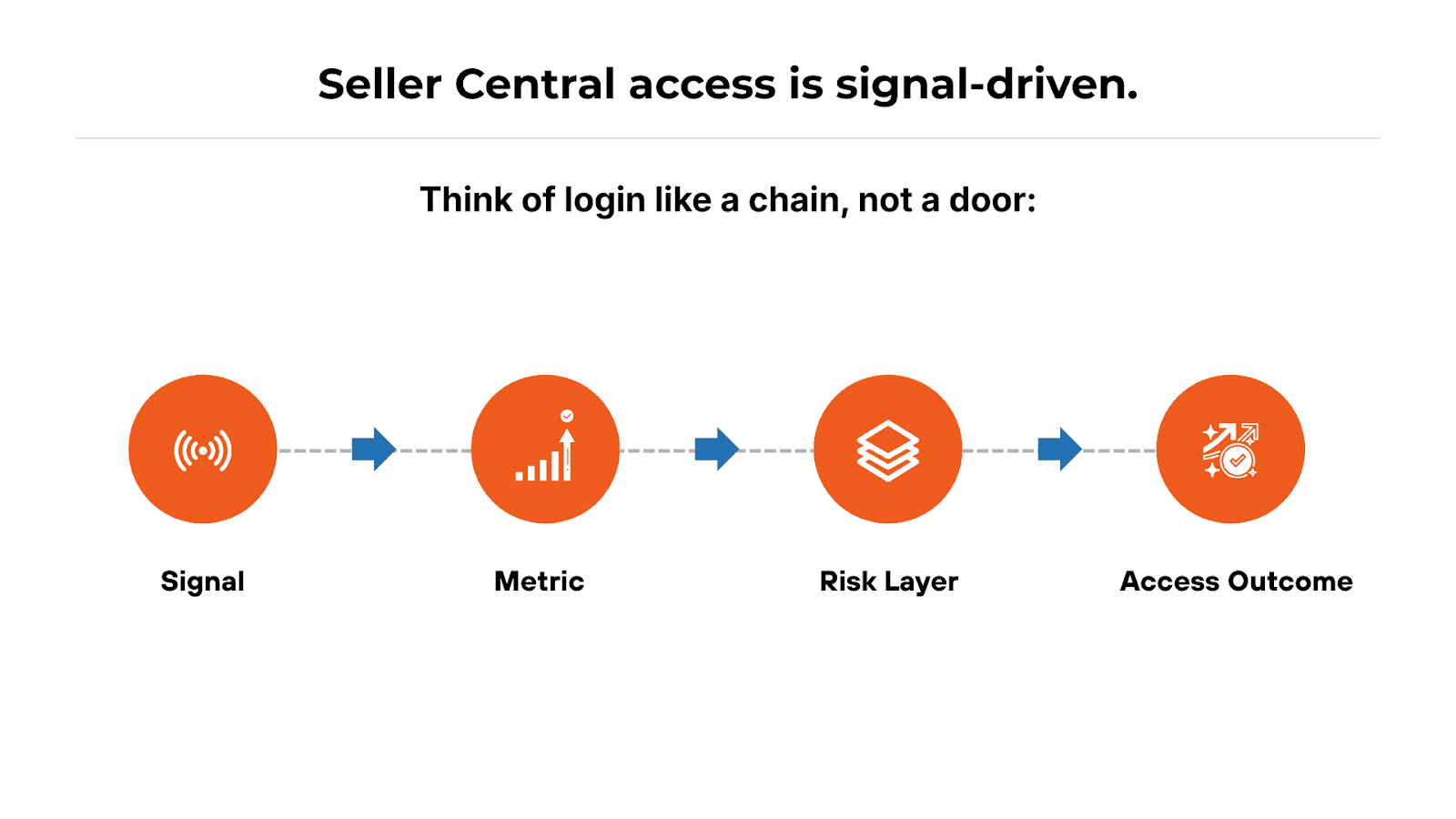
Example causal chain (simple):
New device + new IP + rapid retries → risk score spike → step-up authentication → OTP throttling → 2FA loop
3) Amazon Seller Central Login Diagnostic & Prevention Framework
Amazon seller account login access is conditional: the prompts you see depend on risk scoring, account standing, and session integrity. Below is the framework we use to prevent “panic clicking” and get to the correct next step fast.
Step 1: Continuous Signal Monitoring
Most lockouts don’t come out of nowhere. Signals often show up first as:
unexpected security prompts
verification requests
billing validity warnings
user/role changes
new device or location sign-ins
sudden case activity you didn’t initiate
ave7LIFT® operationalize Monitor → Diagnose → Restore, so you don’t treat a risk-scored access event like a password problem.
Step 2: Policy-Level Violation Detection
Same symptom, different cause:
Security friction (risk loop, throttling)
Verification holds (identity, business verification steps)
Billing restrictions (invalid charge method, payment failure)
Treating them as the same problem wastes time—and increases risk.
Step 3: Root-Cause Mapping
Map the symptoms to the failing layer:
Portal/URL layer: wrong region, wrong endpoint
Auth layer: credentials, 2FA enrollment, OTP delivery
Session layer: cookies, extensions, competing sessions
Standing layer: billing/verification holds blocking actions
Compromise layer: unauthorized changes, new users, payout edits
Step 4: Guided DIY Resolution
Once you know the failure class, the next move becomes deterministic:
Validate portal + region
Validate 2FA method + recovery paths
Validate billing/charge method status
Validate user role and admin continuity
Validate compromise indicators before you escalate
Step 5: Expert Escalation (If Required)
Escalate only after classification—when DIY stalls or risk is high (persistent loops, suspected compromise, verification/billing holds).
4) ave7LIFT® Is the System, Not a Service
Most sellers have two bad options during a lockout:
Random troubleshooting (creates more risk), or
Hiring help after damage is done.
Instead of “try everything,” you get a structured answer to: What kind of lockout is this, what evidence supports that, and what is the smallest safe action that restores access without worsening the risk score?
If guided steps don’t resolve it—or if the failure class is high-risk (persistent 2FA loops, verification holds, suspected compromise)—ave7LIFT® supports optional escalation to experts after diagnosis is clean, so the case starts with the right failure class and the right evidence trail.
For Ethan, that means no guessing: he stabilizes on one device/network, captures “pre-change” evidence, identifies the failure layer, and takes the correct next step—without turning a temporary access event into a multi-day lockout.
5) Before vs After: Seller Central Login Issues (Dual-Intent)
Before Amazon Seller Account Login Issues: Prevent the Lockout Window
Secure Entry: Using the Right Seller Central Portal (USA + Regions)
Portal mismatch is a common “false login failure.” Sellers search Google, click an ad/lookalike page, or end up in the wrong region.Use the correct Amazon Seller Central portal for your marketplace
Avoid Amazon Seller Central Google search as your primary entry method
Practice bookmark discipline: treat the correct Seller Central entry as a security control
Ethan’s first error was subtle: on mobile, he clicked a cached link that didn’t match his normal Amazon seller central US login path. That mismatch can be enough to trigger additional prompts.
Below are the three controls that keep a minor login hiccup from turning into a full lockout: resilient 2FA, clean admin continuity, and a known-good session environment you can rely on in high-risk moments.
Authentication Resilience: 2FA That Doesn’t Collapse Under Pressure
Authenticator app: usually more reliable under throttling
SMS: common point of failure (delays, carrier filtering, travel)
Backup methods: prevent single-point-of-failure risk (one phone, one admin)
Access Hygiene: Roles, Permissions, and Admin Continuity
Amazon seller account login issues can look like “blocked actions” when the real problem is access scope/permissions/eligibility, not credentials. Fastest safe check: confirm you’re on the right user (owner/admin vs sub-user) and that 2FA/admin access isn’t a single point of failure.
Session Stability: Avoiding Logout Loops Before They Start
Logout loops often come from:conflicting browser profiles
aggressive privacy extensions
stale cookies/session artifacts
competing sessions
Maintain a known-good access environment (one browser profile, minimal extensions, stable network) for high-risk moments.
After Amazon Seller Account Login Issues: Triage Without Making It Worse
Once you’re locked out, your first job is to not make it worse. Start with what not to do—these actions commonly trigger throttling and extend the lockout window.
What Not to Do First
If you’re locked out:Don’t retry 20 times
Don’t flip VPNs repeatedly
Don’t spam OTP requests
Don’t assume password reset is step one
Ethan’s “fix” behavior (device hopping + repeat OTP sends) likely pushed him into throttling.
What to Capture Before You Change Anything
Before you touch settings, capture:exact error text + timestamp
portal/URL used (region context)
user affected (owner vs sub-user)
2FA method + failure mode (no code vs loop)
recent changes: roles, billing, phone/email, travel/VPN
any unusual case activity
This becomes your diagnostic trail—and your escalation evidence if needed.
The Login Failure Classifier (Symptom → Failure Class → What to Validate Next)
Use this as a fast map:Wrong portal/region mismatch → validate marketplace URL + bookmarked entry
Buyer vs Seller endpoint confusion → confirm you’re on Seller Central, not a buyer login path
Credentials/identity mismatch → validate the correct login identity (email/user), not just password
2FA loop / OTP delay / throttling → stop retries; validate 2FA method + recovery; stabilize device/IP
Session instability / auto-logout → known-good browser profile; clear specific session artifacts carefully
Account holds masquerading as login failures → check for verification/billing holds once partial access returns
Suspected compromise → containment first (see next)
Compromise Indicators (High-Severity Path)
If any of these are true, treat it as high severity:new users you didn’t add
payout/bank edits
unexpected listing changes
unfamiliar case activity
Amazon seller account login issues are rarely “just a password problem.” Treat access like Presence infrastructure—control the entry portal, harden 2FA, keep admin continuity, and stabilize your session environment. When something breaks, reduce noise, capture evidence, and classify the failure before you touch settings—because every panicked click can extend downtime and revenue leakage.

Conclusion
Amazon seller account login issues aren’t random outages—they’re the visible result of security and standing signals Amazon has already been scoring. That’s why the fastest resolution is rarely “try more fixes”; it's to stop the spiral, preserve evidence, and diagnose the blocking layer before you change inputs.
When you treat login failure like an access-control event, you regain leverage: you reduce risk amplification, avoid unnecessary holds, and escalate with clarity instead of confusion. Presence stability comes from controlling what you can control—your portal discipline, your authentication resilience, your session environment, and your ability to classify signals early.
Amazon seller account login issues are rarely random. They are predictable, diagnosable, and—when addressed early—preventable.
Summary
Amazon seller account login issues are seldom simple password problems. Most Seller Central lockouts are the result of risk-scored access decisions triggered by signals like new devices or IPs, rapid retries, wrong-region portals, OTP throttling, billing or verification holds, or suspected compromise.
The fastest way back in isn’t trying more fixes—it’s reducing noise, preserving evidence, and diagnosing the exact failure layer (portal, authentication, session, standing, or compromise) before changing inputs. Panic actions like device hopping, VPN flipping, or OTP spamming often increase friction and extend downtime.
ave7LIFT® exists to sit upstream of that chaos. It continuously monitors access and account-level signals, classifies the failure type, and guides the smallest safe action to restore access—without worsening your risk score. And when login issues cross into enforcement, verification holds, or suspension risk, ave7LIFT® provides a clean escalation path backed by evidence, not guesswork.
Amazon seller account login access isn’t random. It’s diagnosable, often preventable, and easiest to resolve when you treat login failures as access-control events—not IT glitches.
Frequently Asked Questions
More Insights from us