
Monitor, Alert, Diagnose & Restore
Amazon Account Risk
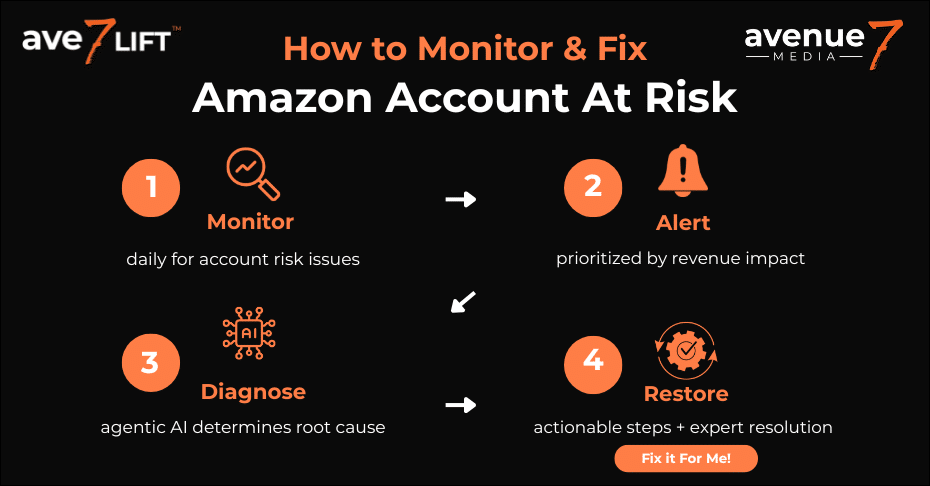
Is Your Amazon Account At Risk of Deactivation? ave7LIFT is the Answer
Proactively Monitor for Amazon Account Risk with Ave7LIFT’s patent-pending tech.
Get daily Alerts for Amazon Account Risk, prioritized by revenue impact.
Diagnose the root cause of Amazon Account Risk with Agentic AI and get recommended fixes.
- Restore your profits and gain peace of mind.
Need help resolving your Amazon Account Risk? Just click the “Fix It For Me” button.
What is Amazon's "Account At Risk" Warning?
“Account at Risk” is an official warning status in Seller Central, often shown as a yellow banner on your Account Health page. This warning means your account has violated Amazon’s policies or failed key performance metrics and is now at risk of deactivation. You must identify and resolve these issues to restore your account to a “Healthy” status.
If Your Account is At Risk, Don't Wait!
Table of Contents
What Does "Amazon Account at Risk" Actually Mean?
Seeing the “Your account is at risk of deactivation” warning is a revenue-draining moment for any seller. This yellow banner on your Seller Central dashboard is Amazon’s official signal that one or more of your performance metrics or policy compliance issues has triggered an automated alert. It is not a suggestion; it is a direct threat to your sales. Understanding exactly what this warning means is the first step to resolving the issue before it escalates to deactivation.
What is the Amazon Account Health Rating (AHR)?
The Account Health Rating (AHR) is a color-coded score from 0 to 1,000 that Amazon uses to measure your compliance with its selling policies. This score, found on your Account Health page, determines your account status: “Healthy” (Green), “At Risk” (Yellow), or “Unhealthy” (Red).
All new sellers start with a score of 200 (“Healthy”). You gain points for successfully fulfilling orders and lose points for policy violations. The severity of the violation (critical, high, medium, or low) determines how many points you lose. This system is designed to quantify your risk level, but it often creates more confusion than clarity. A single, unresolved “critical” violation can drop your score to 0 overnight, even if you have thousands of successful orders. You can find the full list of policies that impact your score in Amazon’s official Account Health Rating program policy.
What is the difference between “at risk” (yellow) and “unhealthy” (red) status?
An “At Risk” (yellow) status means your AHR score is between 100-199, serving as a formal warning that your account is in danger of deactivation. An “Unhealthy” (red) status means your score has fallen to 99 or lower, making your account immediately eligible for deactivation, or it has already been deactivated.
Think of the “At Risk” status as a final warning. Your account is still active, and you are still making sales, but Amazon’s automated systems are now monitoring you closely. The “Unhealthy” status is a critical failure. At this point, you are either one violation away from suspension or already there, likely with your funds frozen. The window to act is shrinking, and the complexity of the required Plan of Action (POA) increases dramatically.
What is the difference between “at risk” and “suspended”?
The “At Risk” status is a warning—your account is still active and selling. A “Suspended” or “Deactivated” status is an action—Amazon has shut down your selling privileges, your listings are inactive, and your funds are often held.
Being “at risk” is your last chance to proactively fix the problem. Being “suspended” means you are now in a reactive nightmare, forced to appeal to Seller Performance with a detailed POA just to get your business back online. Manually tracking the dozens of metrics and policies that can trigger this escalation is a losing battle. This is precisely why we built Ave7LIFT. Our platform doesn’t just monitor for risks; our AI-driven system diagnoses the root cause of the violation and provides clear, actionable recommendations to restore your account health before it ever reaches the point of suspension.
Account At Risk?
The Real Business Impact: What Happens When Your Account is "At Risk"?
The “at risk” warning is not a passive notification; it is an active threat to your brand’s profitability. Ignoring the yellow banner is the equivalent of ignoring a leak in your cash flow. The consequences are not abstract—they are immediate and measurable, impacting your sales velocity, ad performance, and access to your own funds.
Does “Account at Risk” Status Affect Buy Box Eligibility?
Yes, an “at risk” status can absolutely cause you to lose Buy Box eligibility. Because your account health is a major factor in the Buy Box algorithm, any metric failure or policy violation signals to Amazon that you are a high-risk seller, and your offer will be suppressed in favor of a “healthier” competitor.
This is the most immediate and painful impact. The Buy Box is the engine of your sales, and your AHR score is a key component of the algorithm that awards it. When your account slips into “At Risk” status—often due to a rising Order Defect Rate (ODR) or Late Shipment Rate (LSR)—Amazon’s algorithm demotes your offer. Your sales velocity evaporates overnight, not because your price is wrong, but because your account is no longer trusted. Ave7LIFT monitors this connection 24/7, sending intelligent alerts that tie a specific metric failure directly to its impact on Buy Box ownership, allowing you to restore sales faster.
Will Amazon Hold Your Funds? The Immediate Risk to Your Cash Flow
While an “at risk” status does not automatically trigger a fund hold, it places your account under review. If the issue escalates to deactivation or is deemed a severe violation, Amazon can and will freeze your disbursements as a security measure, cutting off your cash flow.
This is the systemic risk that can put a brand out of business. The “at risk” status is the final checkpoint before Amazon takes defensive action, which often includes freezing your funds to cover potential A-to-z claims or returns. When your account is deactivated, this hold is almost guaranteed. You lose access to the capital you need to re-order inventory, pay for ads, and manage operations. Ave7LIFT’s AI-driven diagnosis is designed to prevent this exact scenario. We help you diagnose and resolve the root cause of the violation while you are still in the “at risk” phase, protecting your revenue and ensuring your disbursements remain stable.
The Hidden Cost: Lost Search Visibility and Ad Performance
Yes, poor account health directly impacts your organic search ranking and ad performance. Amazon’s A9 algorithm favors sellers with a proven track record of reliability and policy compliance. When your account is “at risk,” your listings are less likely to be shown in search results, and your ads may stop serving entirely.
Sellers often see their organic rank vanish and assume it’s a keyword or competitor issue. They see their Ad ACOS (Advertising Cost of Sale) spike and blame their bids. The real culprit is often the “at risk” banner. Amazon will not waste a top search result or a premium “Sponsored” ad slot on a seller it deems unreliable. This is the eCom chaos we turn into clarity. Ave7LIFT monitors your ASIN-level performance and alerts you when a drop in organic rank or ad impression correlates with a new account health violation. Our AI diagnoses the true root cause, allowing you to restore your ad performance and search visibility.
How to Find the Root Cause of Your Account Risk
The “at risk” warning is a high-level alert. It tells you that you have a problem, but not why the problem occurred or how to fix it. To resolve the issue, you must first become a detective, digging through Seller Central to find the specific metric failure or policy violation that triggered the warning. This manual, reactive process is exactly what drains a seller’s time and profits.
Where Do I Find the Exact Reason for My “At Risk” Status?
The exact reason for your “at risk” status is located on your Account Health page in Seller Central. You must check the “Customer Service Performance” (for metric failures) and “Policy Compliance” (for violations) widgets to find the specific ASINs or policies causing the warning.
To find this, navigate to the “Performance” tab in Seller Central and click “Account Health.” You will see two primary sections that cause “at risk” warnings:
- Customer Service Performance: This tracks your operational metrics. You will be flagged “at risk” if your Order Defect Rate (ODR) rises above 1%, your Late Shipment Rate (LSR) (for FBM) goes above 4%, or your Valid Tracking Rate (VTR) drops below 95%.
- Policy Compliance: This tracks your adherence to Amazon’s Terms of Service. This is where you will find more complex issues like Intellectual Property (IP) complaints, Restricted Product policy violations, or INFORM Consumers Act compliance issues.
The dashboard only tells you what metric failed, not why it failed. It doesn’t connect a high ODR to a specific batch of defective inventory or a new packaging problem. Ave7LIFT’s AI-driven system doesn’t just monitor this dashboard; it diagnoses the root cause behind the metric, sending intelligent alerts prioritized by revenue impact.
What Are the Most Common Triggers for an “At-Risk” Status?
The most common triggers are failures in key performance metrics—specifically an Order Defect Rate (ODR) above 1% or a Late Shipment Rate (LSR) over 4%. In addition, policy compliance violations, such as Intellectual Property (IP) complaints, repeat violations, or product authenticity issues, can also instantly put an account at risk.
These triggers are broken down into two pillars:
- Pillar 1: Performance Metrics (Fulfillment & Service): This is the “vital signs” monitor for your account. Amazon’s Order Defect Rate is the most critical. Just one or two A-to-z claims or negative feedback comments can put a low-volume seller’s account at risk.
- Pillar 2: Policy Compliance (Rules & Regulations): These are often more severe and harder to fix. A single “Used Sold as New” complaint, a suspected IP violation, or a “repeat violation” (where Amazon’s algorithm believes you are ignoring previous warnings) can drop your Account Health Rating to yellow. You can see the full list of policies Amazon tracks in their official AHR policy documentation.
Why is Manual Monitoring So Ineffective?
Manual monitoring is ineffective because it is reactive. By the time you or your team spots a red flag on the Account Health dashboard, your revenue, Buy Box eligibility, and ad performance have already been compromised. You are left trying to fix a problem that has already cost you money.
This manual process is a losing battle. A critical violation can happen at 3 AM. By the time your team logs in at 9 AM, you’ve already lost six hours of Buy Box ownership. Furthermore, if you have ten violations, the dashboard doesn’t tell you which one to fix first. It gives equal weight to a minor warning on a dead ASIN and a critical IP complaint on your hero product.
This is the eCom chaos we turn into clarity. Ave7LIFT’s AI-enabled platform monitors your entire account 24/7. When an issue is detected, it sends an alert prioritized by revenue impact. Our agentic AI then provides a clear diagnosis of the root cause and a precise recommendation, allowing you to restore your account health before a minor issue becomes a revenue-draining catastrophe.
Don't Gamble with Your Account
Stop Reacting. Start Preventing with Ave7LIFT.
The manual, reactive cycle of “Warning > Panic > Appeal” is a broken model. It treats the symptom (the warning) while ignoring the root cause, guaranteeing you will always be one step behind and losing revenue with every new alert. Ave7LIFT was built by Amazon experts to break this cycle. We provide strategic clarity by shifting your brand from reactive firefighting to proactive, data-driven prevention.
How Can You Proactively Monitor Account Health 24/7?
You can’t, not effectively. Ave7LIFT’s AI-enabled technology monitors your entire Amazon ecosystem around the clock, detecting compliance issues and metric failures in real-time, often long before they trigger an “at risk” warning.
An Amazon algorithm can flag your hero ASIN for a new policy violation at 3 AM. By the time your team logs in, you’ve already lost six hours of Buy Box ownership. Our system monitors for these nearly invisible triggers—like a subtle change in return comments or a new, unverified IP claim—and sends an intelligent alert the moment it’s detected. This isn’t just about checking your AHR score; it’s about monitoring the underlying data that predicts a change to your AHR score.
How is Ave7LIFT’s Diagnosis Different from a Standard Alert?
A standard Amazon alert tells you what happened (e.g., “Order Defect Rate is high”). Ave7LIFT’s agentic AI tells you why it happened (e.g., “Your ODR is high because 80% of negative feedback in the last 72 hours is for ASIN B0XXXX, which is missing a key compatibility instruction in its listing.”)
This is the core of our value proposition: turning eCom chaos into clarity. The problem isn’t the alert; it’s the lack of a clear next step. Our AI-driven Diagnosis sifts through your performance notifications, customer reviews, return reports, and listing data to find the true root cause. You stop wasting hours trying to figure out why your account is at risk and instead get a precise, actionable recommendation to restore your account’s health.
My Dashboard Has Multiple Violations. How Do I Know What to Fix First?
You must prioritize by financial impact. Ave7LIFT is the only platform that automatically calculates the revenue at risk for every single violation and prioritizes your action list to focus on what is draining your profits the most.
A “Restricted Product Policy Violation” on a dead ASIN with zero sales is not the same as a “Used Sold as New” complaint on your top-grossing product. Yet, in Seller Central, they look almost identical. This is a critical flaw in manual monitoring. Our platform connects your account health directly to your sales data. Our intelligent Alerts show you the exact revenue you are losing right now from each issue, allowing your team to allocate resources effectively and restore your most profitable ASINs first.
A Step-by-Step Guide to Resolving Your "At Risk" Status
Seeing the warning is the first step. Resolving it requires a precise, data-driven response. Reacting with the wrong information—or appealing a violation incorrectly—can make the problem worse. This is the standard manual playbook for addressing an “at risk” status before it escalates to deactivation.
What is my immediate 5-step action plan?
First, do not panic. Your immediate steps are: 1) Identify the exact violation on your Account Health page, 2) Triage the issue (e.g., policy vs. metric), 3) Take immediate containment actions (like closing a faulty listing), 4) Investigate the root cause, and 5) Prepare a formal appeal or Plan of Action (POA) if required.
This is the triage phase. Panic leads to bad decisions, like immediately appealing with a weak POA. You must first stop the “bleeding”—if a specific ASIN is causing Order Defect Rate issues, close the listing now. This manual investigation is where sellers lose the most time. You have to sift through voice of the customer data, return reports, and performance notifications. This is precisely the “eCom chaos” Ave7LIFT was built to solve. Our AI-driven system Diagnoses the root cause for you, turning a five-hour fire drill into a five-minute fix.
How do I write a preemptive Plan of Action (POA) that works?
A successful Plan of Action (POA) must be clear, factual, and follow Amazon’s required three-part structure: 1) The root cause of the problem, 2) The immediate actions you took to resolve the issue for affected customers, and 3) The long-term preventative measures you have implemented to ensure it never happens again.
Avoid emotion, excuses, or blaming Amazon’s automated systems. Your POA must demonstrate ownership. Be specific. Instead of “We will monitor listings better,” write “We have implemented a daily, 3-point check for ASIN B0XXXX to verify inventory and shipping compliance.” This is your official appeal to Amazon, and getting it wrong can lead to a suspension. For complex issues, you must consult Amazon’s official guide on how to appeal an account deactivation or listing removal. The challenge is that you can’t write a good POA until you have a perfect Diagnosis of the root cause—which is where the Ave7LIFT platform gives you an unassailable data-driven edge.
How do I fix an “at risk” status from a high Order Defect Rate (ODR)?
To fix a high Order Defect Rate (ODR), you must immediately identify which component—Negative Feedback, A-to-z Claims, or Credit Card Chargebacks—is causing the failure. Then, you must find the specific ASINs or orders responsible and take action to prevent new defects while you wait for the 60-day metric window to roll over.
A high ODR (anything over Amazon’s 1% target as defined here) is a direct threat to your Buy Box. You must analyze all customer feedback and A-to-z claims to find a pattern. Is it a shipping issue? A defective product batch? A misleading listing image? This manual detective work is slow. Ave7LIFT’s AI-powered Diagnosis connects these dots in seconds. It Alerts you to a rising ODR, Diagnoses that it’s tied to a single ASIN’s recent influx of negative reviews, and recommends the precise action to Restore your metric health.
How do I fix an “at risk” status from a high Late Shipment Rate (LSR)?
To fix a high Late Shipment Rate (LSR) (for FBM sellers), you must ensure your on-time shipment and handling processes are 100% compliant with your listing’s promised handling time. This often involves auditing your warehouse operations, adjusting your handling time settings in Seller Central, or confirming shipments more rapidly.
This metric failure is common during peak seasons. If you promise a 1-day handling time, you must ship within 1 day. To fix a high LSR (which must be kept under 4%), you need to either ship faster or change your promise by extending your handling time to 2-3 days. This gives you a buffer but can also make your offer less competitive. It’s a trade-off. Ave7LIFT Monitors this metric daily and can Alert you to an LSR spike prioritized by revenue, so you can make a data-driven decision before it costs you the Buy Box.
Stop Guessing What's Hurting Your Account
The Intelligent Solution: Turn eCommerce Chaos into Clarity
The manual guides, the 5-step plans, the endless forum scrolling—it’s all part of a broken, reactive system. Ave7LIFT provides the definitive solution. We’ve combined our deep, “in-the-trenches” Amazon expertise with proprietary AI-enabled technology to create a platform that doesn’t just show you the problem; it gives you the solution.
Step 1: How Does AI Provide a True Diagnosis (Not Just an Alert)?
Our agentic AI performs a comprehensive analysis that goes far beyond the “at risk” warning on your dashboard. It connects your account health data with customer reviews, return reports, and listing information to find the true root cause of the violation.
An Amazon alert tells you, “Your Order Defect Rate is high.” That’s not a diagnosis; it’s a symptom. Ave7LIFT’s AI acts as your most powerful analyst. It Diagnoses the problem by correlating data from multiple, disconnected sources, concluding: “Your ODR is high because ASIN B0XXXX has a 30% spike in 1-star reviews in the last 72 hours. 85% of those reviews mention the word ‘broken,’ ‘leaking,’ or ‘damaged.'” This is the difference between knowing you’re sick and knowing the precise illness.
Step 2: What Are “Actionable Recommendations”?
Based on its AI-driven diagnosis, our platform provides a clear, step-by-step checklist of what to do next. This isn’t a vague “check your inventory”; it’s a specific, prioritized action plan designed to Restore your account health as quickly as possible.
We turn complex eCom chaos into a simple, clear set of instructions. For the “broken/leaking” product diagnosis, our recommendation isn’t just “fix it.” It’s:
- Immediate Action: “Pause all Sponsored Products ad campaigns for ASIN B0XXXX to stop burning cash on a defective product.”
- Inventory Control: “Create a removal order for all FBA inventory of this ASIN to conduct a physical inspection.”
- Customer Service: “Use this template to proactively message the last 15 buyers who left 1-star reviews.”
This turns a moment of panic into a manageable process.
Step 3: What If I Just Want You to “Fix It For Me”?
For brands that need to focus on growth, not compliance, our platform includes a “Fix It For Me” option. This enables our team of ex-Amazonians and expert operators to execute the AI’s recommended solution on your behalf.
This is where our proprietary technology, proven strategy, and unmatched expertise come together. Perhaps you don’t have time to create removal orders, or you’re not confident in writing a compelling Plan of Action (POA) that will satisfy Amazon’s automated systems. By enabling our team, you authorize us to take the AI-driven diagnosis and see it through to resolution. We will write the appeal, manage the case log, and handle the operational work needed to Restore your account, turning a complex, revenue-draining problem into a fully-managed solution.
Turn Chaos Into Clarity with ave7LIFT
Conclusion
An “Amazon Account Risk” warning is more than a notification; it’s a direct and immediate threat to your revenue. But this systemic complexity doesn’t have to be a constant, profit-draining fire drill.
- The “Account at Risk” (yellow) status is Amazon’s final warning before deactivation. It means your Account Health Rating (AHR) score has dropped to between 100-199.
- The business impact is immediate and severe, leading to lost Buy Box eligibility, suppressed ad performance, and a direct threat to your cash flow and disbursements.
- Reactive, manual monitoring is a failed strategy. By the time you find the problem in Seller Central, the financial damage is already done.
- Ave7LIFT provides the definitive solution: our AI-enabled tech helps you Monitor 24/7, sends Alerts prioritized by revenue, Diagnoses the true root cause, and helps you Restore your profitable growth.
Amazon Account Risk FAQs
What does "account at risk" mean on Amazon Seller Central?
This is the yellow warning banner on your Account Health dashboard, indicating your account (with an AHR score between 100-199) has violated a policy or failed a key performance metric. It is Amazon’s final warning before deactivation. The main challenge is that the warning itself is vague; it doesn’t provide a clear root cause. Ave7LIFT’s platform provides an instant AI-driven Diagnosis to pinpoint the exact reason, turning a vague warning into an actionable plan.
What is the Amazon Account Health Rating (AHR)?
The Account Health Rating (AHR) is a color-coded score from 0 to 1,000 that Amazon uses to quantify your account’s health. You start at 200 (“Healthy”), gain points for good performance, and lose points for violations. Manually tracking this fluctuating score is stressful and reactive. Ave7LIFT Monitors the underlying data 24/7, so you get an Alert at the first sign of trouble, before your score plummets.
How is the Account Health Rating (AHR) calculated?
The AHR is calculated based on the number and severity (critical, high, medium, or low) of policy violations on your account over a rolling 180-day period. This complexity means a single “critical” violation can drop your score to zero overnight, even if you have thousands of successful orders. Our platform Diagnoses the revenue impact of each violation, helping you prioritize which fires to fight first.
What is the difference between "at risk" (yellow) and "unhealthy" (red) status?
“At Risk” (AHR 100-199) is a warning; your account is still active but in danger. “Unhealthy” (AHR 99 or lower) is a critical failure; your account is either eligible for deactivation or has already been deactivated. The key is to act in the “yellow” stage. Ave7LIFT helps you Restore your account health while it’s “at risk,” preventing the catastrophic revenue loss of a “red” status.
What should I do if my Amazon account is at risk of deactivation?
Your first step is to not panic. You must immediately investigate your Account Health page to identify the specific violation. The challenge is that the root cause is often hidden. Ave7LIFT’s AI-driven Diagnosis sifts through your data to find the precise cause and provides a clear, actionable recommendation to Restore your account health, fast.
How do repeat violations impact my account health score?
Repeat violations are severe. Amazon’s algorithm punishes you more heavily for the same violation in a 180-day period, causing your AHR score to drop much faster. This is a common problem for sellers who fix the symptom but not the root cause. Ave7LIFT’s AI Diagnosis ensures you fix the underlying issue (e.g., a “leaking” product, not just a “bad review”), preventing these costly repeat violations.
Why is my account at risk due to the INFORM Consumers Act?
This warning means you have failed to provide or verify required business information (like your address, tax ID, or bank account) by Amazon’s deadline. It is a compliance-based risk, not a performance-based one. Ave7LIFT Monitors for these compliance deadlines and policy changes, sending you proactive Alerts so you can resolve verification issues long before they ever threaten your account.
What is the difference between an Amazon account review, suspension, and deactivation?
A “review” is a temporary hold where Amazon investigates your account (you may or may not be able to sell). “Suspension” (or “deactivation”) is when Amazon has shut you down. “At Risk” is the final warning before a suspension. Our platform is designed to keep you permanently out of this cycle, using our Monitor, Alert, and Diagnose framework to resolve issues before they ever escalate to a review or suspension.
How long does the "at risk" status last on Amazon?
The “at risk” status lasts until you either 1) successfully resolve the underlying policy violation(s) or 2) the violations age out of the 180-day rolling time window. Simply waiting is a high-risk gamble that can cost you the Buy Box and sales for months. The goal is to get it Restored immediately. Ave7LIFT provides the clear Diagnosis and action plan to remove the warning, typically in a fraction of the time it takes to do manually.
Does an "at risk" status affect my Amazon Buy Box eligibility?
Yes, absolutely. Account health is a primary factor in the Buy Box algorithm. An “at risk” status signals to Amazon that you are an unreliable seller, and your Buy Box ownership will be suppressed in favor of competitors with “Healthy” accounts. This is a direct, immediate, and catastrophic drain on your revenue. Ave7TFLIFT’s Alerts are prioritized by revenue impact, allowing you to Restore your Buy Box on your most critical ASINs first.
We've Worked with over 1,000 Companies
Trusted by Sellers, Backed by Experts
“Ave7Lift restored my $1.5M listing in 2 days, saving my business!”





Built by ex-Amazonians, engineers, former sellers, and agency veterans who’ve scaled brands to millions
Featured for transforming how brands scale on Amazon.