
Monitor, Alert, Diagnose & Restore
Amazon FBA Inactive (Out of Stock)
Account Health Issues? Ave7LIFT™ is the Answer.
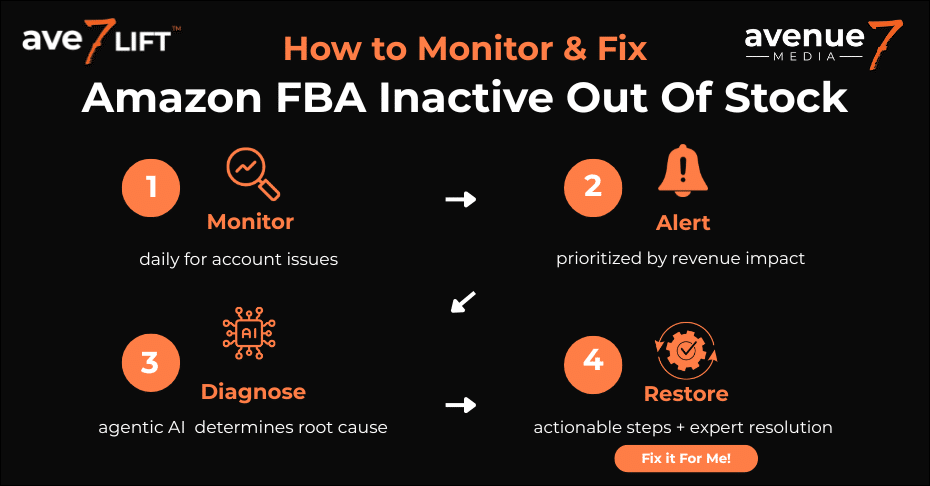
- Proactively monitor your Amazon Account Health with Ave7LIFT’s patent-pending tech.
- Get daily alerts for Account Health, showcasing the potential revenue impact.
- Diagnose the root cause of Account Health issues with Agentic AI and get recommended fixes.
- Need help trying to restore your Account Health? Just click the “Fix It For Me” button.
- Boost your profits and gain peace of mind.
Are Inactive (OOS) Errors Costing You Sales Even When You Have Units Available?
The Amazon FBA ‘inactive out of stock’ status occurs when your physical inventory in an FBA warehouse is not connected to an active online listing. This disconnect, often called Stranded Inventory, makes your products unsellable despite being in stock. Common causes include listing errors, pricing issues, or incomplete product information.
Don't Let Amazon Health Issues Cost You Sales!
Table of Contents
The Silent Sales Killer: Why Your FBA Inventory is Showing as Unavailable (And How to Fix It)
Why Does My Listing Say ‘Inactive (Out of Stock)’ When I Have FBA Inventory?
This maddening error occurs because the digital link between your physical inventory and your active Amazon listing has been broken. Even though your units are sitting in a fulfillment center, a listing-level issue—what Amazon officially calls “Stranded Inventory”—is preventing them from being available for sale.
It’s one of the most frustrating alerts in Seller Central. You’ve done everything right: you forecasted demand, shipped your products to an FBA fulfillment center, and your inventory report confirms hundreds of units are “Available.” Yet, your public-facing product page bluntly states: “Currently unavailable.” This isn’t a system-wide glitch; it’s a specific, costly problem tied directly to your listing that immediately halts your revenue. Manually hunting for the root cause is a reactive, time-consuming process that costs you sales with every passing hour.
This is why we built Ave7LIFT. Instead of you having to search for problems, our proprietary AI-enabled technology constantly Monitors your listings for these exact disconnects. When an issue is detected, we send you an intelligent Alert prioritized by revenue impact, and our agentic AI Diagnoses the precise root cause. We provide clear, actionable recommendations so you can Restore your sales immediately—or you can simply enable our team to fix it for you.
What is the Immediate Impact of an Inactive FBA Listing?
The immediate impact is a halt in revenue, capital being tied up in non-selling assets, and a rapid decline in your product’s Best Seller Rank (BSR) and keyword rankings. For every hour your product is unavailable, you are actively losing sales directly to your competitors.
This status is a silent sales killer, and its damage is immediate and multi-layered:
- Lost Sales: The most obvious cost is lost revenue. Your would-be customers aren’t waiting; they’re clicking “Add to Cart” on a rival’s listing, boosting their sales velocity at the direct expense of yours.
- Stranded Capital: The inventory you invested in is now a non-performing asset. Your capital is tied up in products that are accruing FBA storage fees without generating a single dollar in return, crippling your cash flow.
- Sinking BSR: Amazon’s algorithm rewards momentum. Your Best Seller Rank (BSR) is a direct reflection of recent sales history. When your sales velocity drops to zero, your BSR plummets, erasing your visibility on category pages and making it harder for new customers to discover you.
Resolving this isn’t just about turning a listing back on—it’s about stopping a downward spiral that can erase weeks of hard-earned ranking and momentum.
Is your Account Health "At Risk"?
Deconstructing the Disconnect: Listing Status vs. Physical FBA Inventory
What’s the Difference Between an ‘Active’ and ‘Inactive’ Listing?
An ‘Active’ listing is visible and available for purchase, while an ‘Inactive’ listing is not visible to customers on the Amazon marketplace. A listing can become inactive for several distinct reasons, including being out of stock, manually closed by the seller, blocked by Amazon for a policy issue, or suppressed due to a pricing error.
To resolve your issue, you first have to understand the platform’s inherent complexity. Amazon operates two separate systems: the digital product catalog (your listing status) and the physical logistics network (your FBA inventory). The problem arises when these two systems fall out of sync. According to Amazon’s official documentation, there are four primary types of ‘Inactive’ status, each with a different root cause and resolution path :
- Inactive (Out of Stock): The most common reason, triggered when the sellable quantity of an FBA item reaches zero.
- Inactive (Closed): A status resulting from a deliberate seller action to temporarily remove an offer from the marketplace.
- Inactive (Blocked): A status imposed by Amazon due to a compliance issue, such as a restricted or recalled product. These listings will have a red or yellow icon indicating whether they can be relisted.
- Inactive (Potential High Pricing Error): An automated status triggered when a product’s price appears to be an error, suppressing the listing to protect customers.
Manually digging through Seller Central to figure out which type of inactive status you have is the first time-consuming hurdle. This is a core function of Ave7LIFT; our AI doesn’t just tell you a listing is inactive—it Diagnoses the precise reason and provides the correct, actionable next step.
What Do FBA Inventory Statuses Like ‘Reserved’ and ‘FC-Transfer’ Mean?
These statuses describe the physical location and state of your inventory within Amazon’s fulfillment network. ‘Available’ means units are processed and ready to ship, ‘Reserved’ means they are tied to a customer order or being checked in, and ‘FC-Transfer’ means they are being moved between warehouses to get closer to customers.
Independent of your digital listing status is the physical reality of your inventory. A common point of confusion is seeing zero ‘Available’ units while having a large number in ‘Reserved’ or ‘FC-Transfer.’ It’s critical to understand what these mean, as outlined on Amazon’s FBA Inventory overview page :
- Available: Units are fully processed, ready to ship, and can fulfill customer orders.
- Reserved: Units are temporarily unavailable because they are tied to a pending customer order, being checked in at a warehouse, or undergoing other internal processing.
- FC-Transfer: Units are being moved between fulfillment centers. These items are often still buyable by customers, but may show a future ship date.
While these statuses are part of normal operations, a sudden shift or a prolonged ‘Reserved’ status can be an early indicator of a deeper problem. Ave7LIFT Monitors these inventory states 24/7, providing a clear, consolidated view that helps you distinguish between normal logistical movements and a developing issue that needs your attention.
What is the Difference Between ‘Inactive (Out of Stock)’ and ‘Stranded Inventory’ on Amazon?
‘Inactive (Out of Stock)’ is the symptom—a listing status that appears when your sellable FBA quantity is zero. ‘Stranded Inventory’ is the disease—the official Amazon term for physical inventory in a fulfillment center that has no active listing associated with it, making it unsellable.
This is the absolute core of the “inactive but available” problem. The issue isn’t with your physical units; they exist and are accounted for. The problem is that the digital link—the active listing—that makes them available for sale has been broken for a specific reason. Every cause of stranded inventory is a listing-level issue that severs this connection, rendering your physical stock invisible and unsellable.
This is precisely the high-impact, revenue-draining problem Ave7LIFT was built to solve. Our system is designed to:
- Monitor: Proactively watch for the exact moment this digital link breaks.
- Alert: Send you an immediate notification, prioritized by revenue impact.
- Diagnose: Use agentic AI to identify the specific root cause (e.g., a pricing error, deleted listing, or new compliance requirement).
- Restore: Provide clear, actionable recommendations to fix the issue and get your product selling again—fast.
The Top 7 Reasons Your FBA Listing is Inactive (And How to Diagnose Them)
Reason 1: Simple Listing Errors (Closed, Deleted, or Incomplete Information)
A listing can become inactive due to simple errors like being accidentally closed, deleted, or having incomplete information such as missing images or bullet points. A deleted listing is particularly dangerous, as any future customer returns for that ASIN will become stranded with no offer to be attached to.
These are often the most frustrating causes because they can feel invisible. A team member might accidentally click ‘Close listing’ instead of ‘Edit.’ Or, even more commonly, Amazon may update its requirements and suddenly your listing is considered “incomplete” for missing a data point that wasn’t required when you first created it. According to Amazon’s own policy, you should never delete a listing with FBA inventory; always use the Close a listing option to maintain the connection to your physical stock.
Manually checking hundreds of SKUs for these small data gaps is inefficient and prone to error. Ave7LIFT’s AI-powered technology constantly Monitors your entire catalog for these specific listing integrity issues. We Alert you the moment a listing is closed or flagged as incomplete, so you can Diagnose and Restore it in minutes, not days.
Reason 2: Pricing Errors and Automated Suppressions
If your product’s price is set too high or too low compared to recent prices, Amazon’s automated systems can suppress the listing to prevent potential pricing errors, making it inactive. This is a protective measure for customers but can easily be triggered by a simple typo or a poorly configured automated repricer.
This automated suppression is a common culprit behind a suddenly inactive listing. While the fix is often as simple as updating the price to be within a reasonable range, the real challenge is detecting the issue in the first place. You won’t always get a clear performance notification; your listing will simply stop making sales.
This is where proactive monitoring becomes critical. Ave7LIFT Diagnoses these specific pricing suppressions in real-time. Our system sends you an Alert identifying the exact ASIN and the price that triggered the issue, allowing you to correct it immediately and get your product back in the Buy Box.
Reason 3: Restricted ASINs or Required Brand & Category Approvals
Your listing will become inactive if Amazon restricts the ASIN due to a policy violation, or if you suddenly require new brand or category approval to sell the product. These restrictions can be triggered by anything from intellectual property complaints to new safety documentation requirements.
The Amazon marketplace is not static; compliance and category requirements change constantly. You may have been approved to sell a product for years, only for Amazon to implement a new “gating” requirement that strands your inventory overnight. In other cases, a competitor might file a baseless IP complaint that gets your listing automatically shut down while you appeal.
Navigating these compliance hurdles is a significant challenge. Ave7LIFT helps provide strategic clarity by constantly Monitoring for these new restrictions. We Alert you to new brand, ASIN, or category requirements, often before you even see the notification in Seller Central, giving you a head start on the approval process to Restore your listing’s active status.
Reason 4: FBA Inbound Shipment and SKU Mismatches
Discrepancies between your FBA shipping plan and what the fulfillment center actually receives—such as an incorrect SKU, quantity, or a product not included in the original plan—can cause your inventory to be stranded and the listing to be inactive.
Accuracy during the shipment creation process is a non-negotiable best practice. When the warehouse receives items that don’t perfectly match the digital shipping plan, their system has no active offer to connect the physical units to. This results in stranded inventory and a halt in sales until you can reconcile the discrepancy with Seller Support.
While Ave7LIFT can’t pack your boxes for you, our system provides an essential safety net. We Alert you the moment a receiving discrepancy at an FBA facility strands your inventory. Our AI Diagnoses the issue, allowing you to open a targeted case with Amazon support to find your units and Restore your sales faster.
Reason 5: Account Health Issues and Product Policy Violations
A dip in your account health metrics or a specific product policy violation, such as an intellectual property complaint or a high number of customer returns, can lead to Amazon blocking the listing. A blocked listing will show a red or yellow icon in Seller Central, indicating the severity of the issue.
Amazon’s primary goal is to protect the customer experience. If your product receives too many negative reviews, has a high return rate for “defective” reasons, or is flagged for a potential compliance issue, Amazon will act swiftly to make it unavailable for purchase. The challenge for sellers is connecting a vague “Account Health Warning” to the specific ASIN that’s been deactivated.
Our platform provides a holistic view, connecting account health warnings directly to the listings they impact. Ave7LIFT gives you clarity by Monitoring these performance metrics, sending Alerts for policy violations, and helping you Diagnose the root cause so you can address the underlying issue with Amazon.
Reason 6: Incorrect Fulfillment Channel (FBM vs. FBA)
If a listing is accidentally switched from ‘Fulfilled by Amazon’ (FBA) to ‘Fulfilled by Merchant’ (FBM), the FBA inventory will become stranded because there is no active FBA offer for it. This can happen with a single mistaken click or a bulk file upload error.
This is one of the simplest yet most common technical errors to cause stranded inventory. Your physical units are sitting in an FBA warehouse, ready to ship, but the digital listing is telling Amazon’s system that you will be fulfilling the order from your own facility. The result is a complete disconnect and zero sales.
This is a perfect example of an issue that should be resolved in minutes, not days. Ave7LIFT’s AI immediately detects this channel mismatch. We send an Alert, Diagnose the problem as an incorrect fulfillment channel, and provide a clear recommendation to switch it back to FBA to Restore your sales.
Reason 7: Expired Products
For products with an expiration date, Amazon will automatically make the inventory unsellable and strand it once that date passes, leading to an inactive listing. FBA has strict shelf-life requirements, and any product that doesn’t sell fast enough can be flagged as expired and stranded.
This is a critical issue for sellers in categories like grocery, supplements, and cosmetics. Once a product is marked as expired by Amazon, your only option is to create a removal order to have it returned or disposed of, resulting in a total loss on that inventory.
Reactive management of expired goods is a guaranteed way to lose money. Ave7LIFT provides a proactive solution with advanced inventory age tracking. We Monitor your batches and Alert you to inventory that is approaching its expiration date. This gives you the crucial window of opportunity to implement a sales strategy—like running a promotion or a coupon—to sell through the inventory before it becomes a costly, unsellable problem.
The True Cost of Inaction: A Compounding Problem That Goes Beyond Lost Sales
What Are the Direct Financial Costs of Stranded Inventory?
The direct financial costs are the ongoing FBA storage fees you are charged for inventory that cannot be sold, including punitive Aged Inventory Surcharges that increase dramatically the longer an issue goes unresolved. While your stranded inventory generates zero revenue, it continues to accrue costs, creating a significant and unseen drain on your profitability.
Letting even a single ASIN remain stranded is like paying rent on a storefront that’s locked shut. The costs are not just theoretical; they are a real, compounding drain on your balance sheet:
- Ongoing Monthly Storage Fees: Amazon continues to charge standard monthly storage fees for every unit held in its fulfillment centers, regardless of its sales status.
- Punitive Aged Inventory Surcharge: This is where the real financial pain begins. Inventory that remains stranded for extended periods becomes subject to harsh surcharges. These fees begin at 181 days and increase exponentially over time, with tiers at 181-270 days, 271-365 days, and a crippling fee for anything over 365 days.
Reacting to these fees after they appear on your statement is too late—the damage is done. Ave7LIFT’s proactive Monitoring and Alerts are designed to prevent this exact scenario. We notify you of a stranded inventory issue long before it has a chance to become “aged,” helping you avoid these profit-eroding penalties entirely.
How Does Stranded Inventory Affect My IPI Score?
Stranded inventory negatively affects your Inventory Performance Index (IPI) score, a key metric Amazon uses to gauge your inventory management efficiency. A low IPI score (below 400) can result in strict FBA storage volume restrictions, severely limiting your ability to send in new or fast-selling products.
Your IPI score is one of the most critical metrics for scaling your FBA business. It’s Amazon’s way of ensuring sellers are using their warehouse space efficiently. When you have inventory sitting idle and unsellable, it signals to Amazon that you are not managing your stock effectively, which directly lowers your score.
Falling below the required IPI threshold is not a minor penalty; it can cripple your growth by preventing you from stocking your bestsellers during peak seasons. Ave7LIFT helps you maintain a healthy IPI score by ensuring your inventory is always active and sellable. Our system Diagnoses the root causes of stranded inventory and provides the recommendations you need to Restore your listings, directly protecting your IPI score and your ability to grow.
What is the ‘SEO Downward Spiral’ and How Do Stockouts Cause It?
The ‘SEO Downward Spiral’ is the long-term damage to your product’s organic search ranking caused by a stockout. When your listing becomes inactive, your sales velocity drops to zero, signaling to Amazon’s A9 algorithm that your product is no longer relevant for its target keywords, causing your rankings to collapse.
This is the most significant and often underestimated cost of an inactive listing. When your product is finally back in stock, it does not return to its previous ranking. Here’s why:
- You Lose Sales Velocity: Recent sales history is a primary factor in Amazon’s search algorithm. A stockout kills your momentum.
- Your Keyword Rankings Collapse: With no sales, Amazon concludes your product is no longer relevant for its most valuable keywords and pushes you down the search results.
- You Actively Help Your Competitors: While you are out of stock, your would-be customers are buying from your competitors. You are not just losing sales; you are actively handing them to the competition, boosting their sales velocity and solidifying their keyword rank above yours.
Recovering from this spiral requires an expensive and unplanned investment in Pay-Per-Click (PPC) advertising to “buy back” the sales velocity you lost. Ave7LIFT’s core mission is to prevent this catastrophic damage. By providing immediate Alerts and an AI-driven Diagnosis, we help you Restore your listing in hours, not weeks, preserving your hard-earned rank and preventing the costly process of a full-scale relaunch.
The Manual Fix: A Step-by-Step Guide to Reactivating Your Listing in Seller Central
Step 1: Your Single Source of Truth – The ‘Fix Stranded Inventory’ Dashboard
To begin fixing your inactive listing, navigate to the ‘Fix Stranded Inventory’ page in Seller Central, which is the most accurate source of information regarding your inventory’s status. You can find this dashboard by going to Inventory > Manage Inventory and clicking the ‘Fix stranded inventory’ link that appears at the top of the page.
This dashboard is Amazon’s official diagnostic tool and should be your first and only destination when you suspect an issue. While the ‘Manage Inventory’ page might show a listing as ‘Active,’ the Fix Stranded Inventory page has the most up-to-date information and will correctly identify the disconnect. The problem with this manual process is that it’s entirely reactive; you have to remember to check this page daily, and by the time you find a problem, you’ve already lost sales. Ave7LIFT flips the script from reactive to proactive. Our system Monitors this data 24/7 and sends you an Alert the moment an issue arises, saving you the time and lost revenue associated with manual checks.
Step 2: Identifying Amazon’s Official ‘Stranded Reason’ Code
On the ‘Fix Stranded Inventory’ page, locate the ‘Stranded reason’ column. This column provides Amazon’s official diagnosis for why each ASIN is stranded and is the most critical piece of information for resolving the issue.
This code is the key to solving the puzzle. Amazon has dozens of potential reason codes, from “Listing Closed” to “Missing SKU,” each requiring a different solution. Manually looking up the meaning of each code and determining the correct next step is where many sellers lose valuable time. This is the precise intelligence gap Ave7LIFT was built to fill. Our agentic AI doesn’t just report the code—it Diagnoses the root cause and provides a clear, plain-English recommendation, turning a confusing code into an actionable solution.
Step 3: Executing the Correct Action (Relist, Edit Price, or Open a Case)
Based on the ‘Stranded reason’ code, you must take a specific, prescribed action, such as using the ‘Relist’ function for a closed listing, updating a missing price, or opening a case with Seller Support for more complex issues.
The ‘Fix Stranded Inventory’ page will often provide a dropdown menu with recommended actions. For example, if the reason is ‘Closed Listing,’ you can simply use the ‘Relist’ function. If it’s a ‘Missing Price’ error, you must update the listing with a valid price. For more complex issues like a ‘Restricted ASIN,’ you will need to open a case with Seller Support. Pro Tip: When contacting support for these issues, ask to have your case transferred to the “Captive Team,” as they are often more experienced with resolving complex FBA inventory problems. The risk of the manual fix is choosing the wrong path and delaying the resolution. Ave7LIFT eliminates this risk by providing the exact, correct recommendation needed to Restore your listing.
Step 4: Proactive Prevention: Setting Your Automatic-Action Settings to Protect Your Assets
To prevent Amazon from automatically destroying your unsold inventory, go to the ‘Edit automatic-action settings’ on the ‘Fix Stranded Inventory’ page. You must change the default action for unresolved inventory from ‘Dispose of units’ to ‘Return units to me’.
This is the most critical proactive step any seller can take. Inaction has severe consequences; Amazon’s systems are designed to automatically remove inventory that remains stranded for 30 days, and the default setting is often to dispose of your assets. This single settings change creates a crucial safety net, ensuring your valuable inventory is returned to you rather than being destroyed. While this is a vital failsafe, the ultimate goal is to never need it. Ave7LIFT provides true proactive prevention by identifying and helping you resolve issues long before they reach the 30-day auto-removal window.
Stop Firefighting. Start Preventing. The Ave7LIFT Proactive Solution.
The Old Way: Reactive Manual Checks, Confusing Reports, and Wasted Hours
The traditional method for handling inactive listings involves daily, manual checks of the ‘Fix Stranded Inventory’ page, trying to decipher confusing reason codes, and wasting valuable time reacting to problems that have already cost you sales.
This is the definition of firefighting. You start your day by logging into Seller Central and hunting for problems. You’re reacting to alerts that are often hours or days old, meaning the damage—lost sales, a sinking BSR, and a damaged keyword rank—is already done. It’s an inefficient, stressful cycle that pulls your focus away from what actually grows your business: strategy, marketing, and product development.
The Ave7LIFT Way: AI-Powered Monitoring, Intelligent Alerts, and Root Cause Analysis
Ave7LIFT flips the script from reactive to proactive by using proprietary AI-enabled technology to continuously monitor your listings for issues. Our system sends intelligent, real-time alerts and provides a precise root cause analysis, turning a complex problem into a manageable process.
Instead of you hunting for problems, our system finds them for you. We provide the strategic clarity that Seller Central lacks. Our patent-pending technology is designed to:
- Monitor: Continuously scan your entire catalog for the specific disconnects that cause stranded inventory.
- Alert: Instantly notify you the moment a listing becomes inactive.
- Diagnose: Use agentic AI to identify the exact root cause—no more guessing based on vague reason codes.
We Don’t Just Find Problems—We Prioritize Them by Revenue Impact
Not all inactive listings are created equal; Ave7LIFT goes beyond simple detection by prioritizing every alert based on its direct impact on your revenue. This ensures you focus your attention on the issues that are costing you the most money first.
An inactive listing for your top-selling ASIN during peak season is a five-alarm fire. An inactive listing for a slow-moving product is a minor issue. The problem is, Seller Central treats them all the same. Our system analyzes the sales velocity and price of the affected ASIN to tell you exactly how much potential revenue you’re losing every hour the listing is down, allowing you to allocate your resources with data-driven precision.
Get Clear, Actionable Recommendations or Enable Our Team to Resolve Issues For You
For every issue detected, Ave7LIFT provides a clear, step-by-step recommendation to resolve it quickly. For sellers who want a hands-off solution, you can simply click the “Fix It For Me” button and enable our team of experts to resolve the issue for you.
We turn eCommerce chaos into clarity. Our AI doesn’t just tell you what’s wrong; it tells you how to fix it. You get a simple, actionable playbook for every alert. But we also understand that your time is your most valuable asset. That’s why we offer the option to have our team of former top Amazon sellers and ex-Amazonians—experts who have been in your shoes—execute the fix on your behalf. It’s the ultimate safety net to ensure your products are always available and driving profitable growth.
Stop Guessing What's Hurting Your Account
Conclusion: Turn eCommerce Chaos into Profitable Growth
Navigating the complexities of Seller Central to fix an inactive listing is a frustrating, time-consuming process that costs you money every hour. You don’t have to stay stuck in a reactive cycle of finding and fixing problems after the damage is already done.
- The Core Problem: The ‘amazon fba inactive out of stock but available’ status is officially called Stranded Inventory—a critical disconnect between your physical products in an FBA warehouse and your digital, active listing.
- The True Cost: This issue is more than a temporary glitch; it actively drains profits through ongoing storage fees, damages your IPI score, and initiates an “SEO Downward Spiral” by erasing your keyword rankings.
- The Strategic Flaw: Relying on manual, reactive checks means you’re always losing sales before you even find the problem. A proactive prevention strategy is the only way to protect your revenue and drive profitable growth.
- The Definitive Solution: Ave7LIFT provides the complete answer. We Monitor for issues 24/7, send intelligent Alerts prioritized by revenue impact, Diagnose the root cause with agentic AI, and provide the clear recommendations you need to Restore your sales—fast.
Amazon FBA Inactive Listing FAQs
How can I prevent my listings from becoming inactive in the first place?
The best prevention is a proactive monitoring strategy. Best practices include ensuring all listing information is 100% complete before sending a shipment, being meticulous when creating FBA shipping plans, and carefully managing your pricing to avoid automated suppressions. However, the only foolproof way to prevent prolonged damage is with an automated system like Ave7LIFT, which constantly Monitors for issues, sends real-time Alerts, and allows you to Restore your listings before significant financial or SEO damage can occur.
What is the long-term impact on my organic ranking if my listing is inactive?
The long-term impact is a phenomenon we call the “SEO Downward Spiral.” When your listing is inactive, your sales velocity drops to zero, causing your keyword rankings and BSR to collapse. While you are out of stock, your competitors gain your sales, which further solidifies their higher ranking. Recovering often requires a costly relaunch with aggressive ad spend to “buy back” your lost sales velocity.
Why is my Amazon listing inactive?
Your Amazon listing is inactive because of a specific issue that has made it unavailable for sale to customers. The four most common reasons are: it is out of stock, you have manually closed it, it has been blocked by Amazon for a compliance issue, or it has been suppressed due to a potential pricing error. Manually digging through your account to find the specific reason is time-consuming; Ave7LIFT’s AI Diagnoses the exact cause for you, providing a clear path to resolution.
How do I fix an inactive listing on Amazon?
To fix an inactive listing, you must first identify the root cause by checking the ‘Fix Stranded Inventory’ page in Seller Central. Based on the ‘Stranded reason’ code provided by Amazon, you will need to take a specific action, such as using the ‘Relist’ function, editing the price, or updating missing product information. This manual process is reactive. Ave7LIFT provides a proactive solution, sending you an Alert with a precise diagnosis and the recommended steps to Restore your listing the moment an issue is detected.
Why does my Amazon FBA inventory say "out of stock" when I have available units?
This error occurs because the digital link between your physical inventory and your active Amazon listing has been broken. Amazon officially calls this “Stranded Inventory,” and it means that while your units are physically in a warehouse, a listing-level issue (like a pricing error, closed listing, or incomplete information) is preventing them from being sellable. Ave7LIFT constantly Monitors for these disconnects, so you can fix them before they have a significant impact on your sales.
How long does it take for FBA inventory to become available for sale?
Once your inventory arrives at an Amazon fulfillment center, it typically takes from 2 to 30 days to be fully checked in, processed, and made available for sale, though this can sometimes extend up to 60 days. During this time, units may be in ‘Reserved’ or ‘FC-Transfer’ status. If your inventory is available in FBA but the listing is still inactive, it indicates a stranded inventory issue that requires immediate attention to prevent lost sales.
What is the difference between "Inactive (Out of Stock)" and "Stranded Inventory" on Amazon?
‘Inactive (Out of Stock)’ is the symptom you see in Seller Central when your sellable FBA quantity is zero. ‘Stranded Inventory’ is the official Amazon term for the underlying disease: physical inventory in a fulfillment center that has no active listing associated with it, making it unsellable. Fixing the stranded inventory issue is the only way to resolve the ‘Inactive (Out of Stock)’ status and make your products available for purchase again.
What are the most common reasons for an FBA listing to be inactive?
The top reasons an FBA listing becomes inactive are simple listing errors (closed, deleted, or incomplete), pricing errors, restricted ASINs or new brand/category approvals, FBA shipment mismatches, and account health violations. Each of these issues requires a different solution, and manually diagnosing the correct one is a slow process. Ave7LIFT’s agentic AI Diagnoses the specific root cause and provides the correct, actionable recommendation every time.
Should I delete and relist my ASIN to fix the inactive status?
No, you should never delete a listing that has FBA inventory or may have future customer returns. Deleting a listing permanently severs the connection to your physical stock, guaranteeing that any future returns for that ASIN will become stranded. The correct action is almost always to use the ‘Close Listing’ function, which makes the offer temporarily inactive while preserving the crucial data link to your inventory.
Does stranded inventory negatively affect my Inventory Performance Index (IPI) score?
Yes, absolutely. Stranded inventory directly harms your IPI score because it signals to Amazon that you are not managing your inventory efficiently. A low IPI score (below 400) can lead to severe FBA storage volume restrictions, which can cripple your ability to send in top-selling products. Ave7LIFT helps protect your IPI score by providing the Alerts and Diagnosis needed to Restore your stranded inventory quickly, keeping your stock active and sellable.
We've Worked with over 1,000 Companies
Trusted by Sellers, Backed by Experts
“Ave7Lift restored my $1.5M listing in 2 days, saving my business!”






Built by ex-Amazonians, engineers, former sellers, and agency veterans who’ve scaled brands to millions
Featured for transforming how brands scale on Amazon.